
Contents
00. Overview由網頁 Product Upload 輸入的資料和影像是存在網站上的. 本程式將該資料由網站匯入 ET6.1, 在此檢查後, 再正式合併入 ET6.1 資料庫.
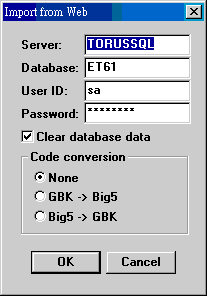
使用系統編碼 WEB-DB 設定欄位預設值.
| Server: | SQL 主機名稱. |
| Database: | 資料庫名稱. 我們通常會設為 ET61. |
| User ID: | sa. 其他亦可. |
| Password: | sa 之密碼. |
| Clear database data: | 匯入資料後把網站資料清除. |
| Code conversion | 語文是否要做轉換. |
匯入後暫存之檔案為 zproduct.dat/.str 及 zsupply.dat/.str.
將暫存的匯入資料正式併入 ET6.1. 要確定系統編碼 WEB-IMAGE 正確設定, 否則影像不會移入. 處理過後, 暫存資料會清除, 網站上影像則保留.
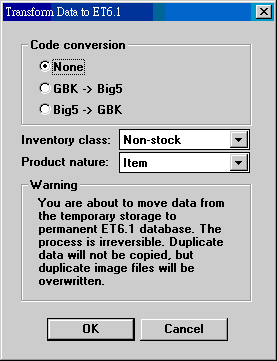
| Code conversion | |
| Inventory class | Non-stock, stock-in, in-stock. 資料在網頁上輸入時, 並未指明庫存性質. 匯出時一次指定. |
| Product nature | Item, part. 資料在網頁上輸入時, 並未指明屬性. 匯出時一次指定. |
| Date | Version | Downloads | Actions & Explanations |
|---|---|---|---|
| 2010-5-14 | SP4 | et115czp.exe. 非繁體中文視窗使用者改下載 et115zip.exe. | Length of item no. extended to 20 bytes. |
| System Code | Field | Example | Field Explanation |
|---|---|---|---|
| UPLOAD-GENRE | 3 | 00 | 1. Language conversion for data import:
0=None, 1=GB->Big5, 2=Big5->GB. 2. Language conversion for data export: 0=None, 1=GB->Big5, 2=Big5->GB. |
| WEB-DB | 3 | Server;Database;sa;Passwod | SQL connection string components. |
| WEB-IMAGE | 3 | w:\custom\c0001\image | Folder for uploaded Web images. |
Last modified: May 2010