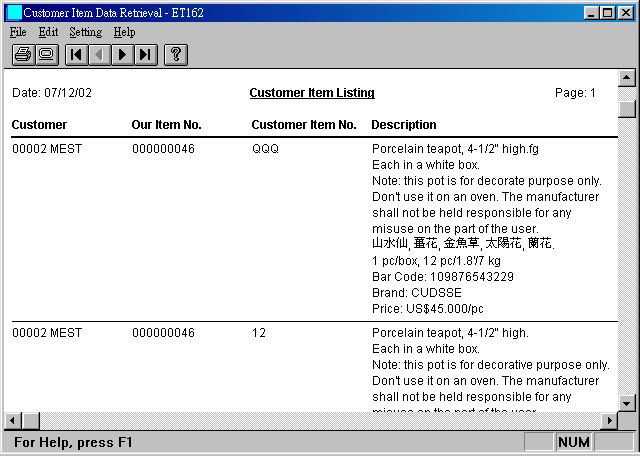
Customer Item Catalog: 以客戶貨號及品名列印產品目錄.
ET162 Customer Item Data Retrieval
客戶貨號資料查詢
Contents
00. Overview查詢客戶貨號資料時, 資料可依我方貨號或客戶貨號排序. 內容為我方貨號和客戶貨號對照表.
|
Customer Item List:
查詢客戶貨號資料. Customer Item Catalog: 以客戶貨號及品名列印產品目錄. |

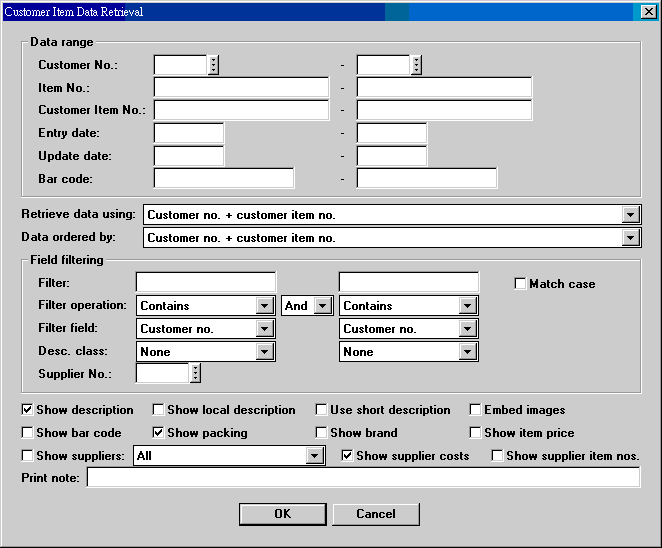
| Data range | 選好適當的資料擷取方式後, 填入對應的起迄資料. 適當的配對, 會加快查詢速度. 任何資料範圍, 都有過濾效果. |
| Retrieve data using | 資料擷取方式: 1. Customer no. + customer item no.; 2. Entry date; 3. Update date; 4. Bar code. |
| Data ordered by | 資料排列方式. 同上. |
| Field filtering | 設定過濾條件. |
| Show description | |
| Show local description | |
| Use short description | |
| Embed images | |
| Show bar code | |
| Show packing | |
| Show brand | |
| Show item price | 指客戶貨號檔上的參考價格. |
| Show suppliers | 顯示供應廠商. All 表所有廠商, Filtering supplier 表只顯示過濾條件中的廠商. |
| Query Items | 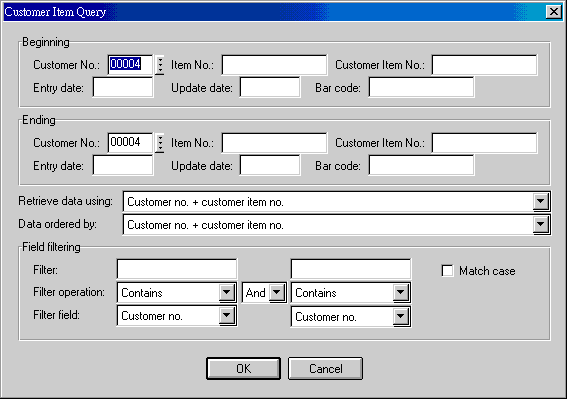 |
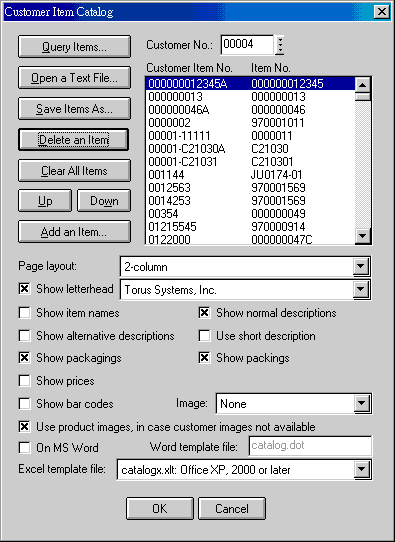
| Open a Text File | 開啟先前用 Save Items As 存出的檔案, 等於再用. |
| Save Items As | 將查詢到的 items 存成檔案, 備將來再用. |
| Delete an Item | 刪除一個項目. |
| Clear All Items | 清除所有項目. |
| Up, Down | 上下調整項目位置. 目錄依項目顯示的列印. |
| Add an Item | 增加單一項目 (貨號). |
| Customer No. | 改變客戶號碼, 可以合併不同客戶貨號至單一目錄. |
| Customer Item No....Item No. | 只顯示客戶貨號及我方貨號 (可能空白), 客戶號碼未顯示. |
| Page layout | 有二欄, 三欄或四欄供選擇. |
| Show letterhead | 列印信頭. Company 決定信頭. |
| Show item names | 使用系統編碼 SYSTEM-GENRE 第 11 字設定. |
| Show normal descriptions | 顯示全部標準品名. |
| Show alternative descriptions | 顯示全部另類品名. |
| Use short description | 選擇此項時, 短品名由 item name 和 normal description 共同提供, 兩項選擇無效. 有 item name 時, 即不再用 normal description. |
| Show packagings | |
| Show packings | |
| Show prices | 指客戶貨號檔上的參考價格. |
| Show bar codes | |
| Use product image... | 若客戶貨號的影像不存在, 改用對應的我方貨號影像. |
| On MS Word | 除了顯示和列印外, 目錄可以匯出成 Microsoft Word 檔案. |
| Excel template file | 內用 Excel 範本, 隨 page layout 改變. |
12. Customer Item Catalog Flat
| Date | Version | Downloads | Actions and Explanations |
|---|---|---|---|
| 2010-10-4 | SP4 | et162zip.exe | 新增 Customer Item Catalog Flat. |
| 2009-1-10 | SP4 | et162zip.exe | Customer Item Catalog 增加 show item name, show alternative description 等選項. |
| Code | Field | Value | Explanation |
|---|---|---|---|
| ET162-CATALOG-FLAT | 3 | 3 numbers | Customizes image width, image height, and column width for description. Default: 2.0,2.5,3.5. |
| ET162-LAYOUT-CATALGF | 3 | 4 numbers | Customizes column positions for Catalog Flat. Default: 0.0,1.8,5.8,7.2 |
| ET162-LAYOUT-CILIST | 3 | 8 numbers | Customizes column positions for Customer Item Listing. |
Last modified: October 2010