
ET631 Invoice Data Input & Net Profit Report
訂單資料沖銷及淨利表
Contents
00. Overview出貨文件資料確實無誤後, 應用發票資料沖銷訂單. 出貨資料在出貨之前常不能確定, 所以最好不要一做好 Invoice 即執行本程式.
本程式主要作業是將出貨資料和訂單資料對照, 沖銷掉出貨之數量, 留存出貨交易記錄, 產生應收帳款. 資料沖銷完成後, Outstanding Order 和 Shipping Schedule 之數字會反映最新情況.
同時一次出貨的 Net Profit Report 雛型產生; 你再輸入出口相關費用後, 便可得到完整詳細的淨利分析表.
本程式貯存每一筆出貨淨利資料, 你可以查詢或列印出貨淨利清單.
另外, 淨利清單可轉入 Microsoft Excel 的樞紐分析表 (pivot table). 樞紐分析表的動態特性提供你近乎無限的多角度查詢, 也把你的資訊處理提升至分析決策境界.
 |
發票資料自動沖銷作業. |
 |
沖銷作業回復作業 . |
 |
其它費用登錄 (如運費, 銀行手續費, 報關費等). |
  |
|
 |
產生 Excel 淨利樞紐分析表. |
執行發票資料沖銷之前, 請至 Setting/Exchange Rate 設定匯率.
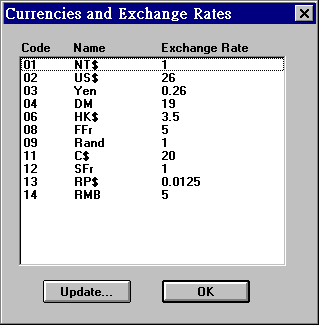
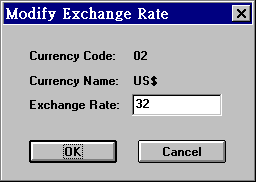
若要更改匯率, 用滑鼠在欲更改之幣別連續點二下, 進入下一畫面. 在 Exchange Rate 欄位輸入匯率後, 按 OK 退出此視窗.
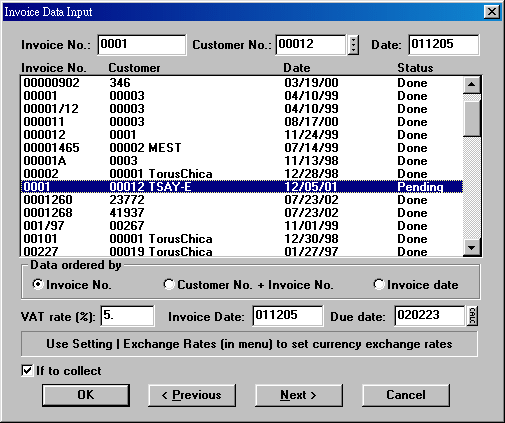
確定沖銷之匯率後, 按工具列  進入沖銷畫面. 輸入 Invoice No. 後, 按 Next 查詢發票狀況,
其中 Status 為 Done 表示已完成沖銷作業. Status 為 Pending 表示該張
Invoice 未完成沖銷作業. 用滑鼠選擇要沖銷之 Invoice, 在 VAT Rate
輸入稅率 (若無請填 0). Due date為客戶的付款日期, 會依客戶檔設定的付款條件自動算出;
亦可自行更改, 按 OK 即完成沖銷.
進入沖銷畫面. 輸入 Invoice No. 後, 按 Next 查詢發票狀況,
其中 Status 為 Done 表示已完成沖銷作業. Status 為 Pending 表示該張
Invoice 未完成沖銷作業. 用滑鼠選擇要沖銷之 Invoice, 在 VAT Rate
輸入稅率 (若無請填 0). Due date為客戶的付款日期, 會依客戶檔設定的付款條件自動算出;
亦可自行更改, 按 OK 即完成沖銷.
須先做過上節之 Invoice Data Input, 才查詢得到資料以輸入各項出口費用. 所有費用均應使用同一幣別. 費用項目十一項, 前七項適用於所有出貨, 後四項自行輸入, 每次出貨可不同自行輸入. 系統編碼 INV-EXPENSES 可設定所有十一個項目.
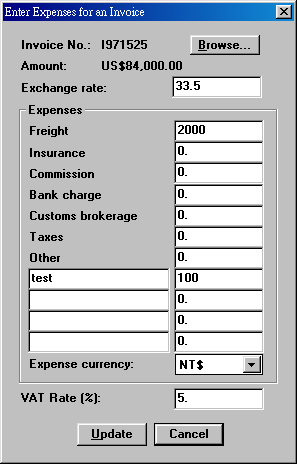
進入畫面, 先按 Browse 找出 Invoice. 輸入各項費用後, 按 Update 存檔.
| Invoice No. | 發票號碼. 以 "Get Invoice..." 找出. |
| Amount | 發票之總金額. |
| Freight | 運費. |
| Insurance | 保險費. |
| Commission | 佣金. |
| Bank Charge | 銀行費用. |
| Customs Brokerage | 報關費. |
| Taxes | 稅捐. |
| Other | 其他雜費. |
| VAT Rate | 國內貿易之營業稅率, 若非國內貿易請勿填寫. |
| Exchange Rate | 匯率. 影響下一節 Net Profit Report 之換算. |
此張報表必須先執行過, 下節之淨利列表內容才會正確. 點選 Multiple Search 可依 Invoice No., Invoice Date, Customer No.
一次找出多張 invoices. Invoice No. 欄位可逐一輸入 invoice number. 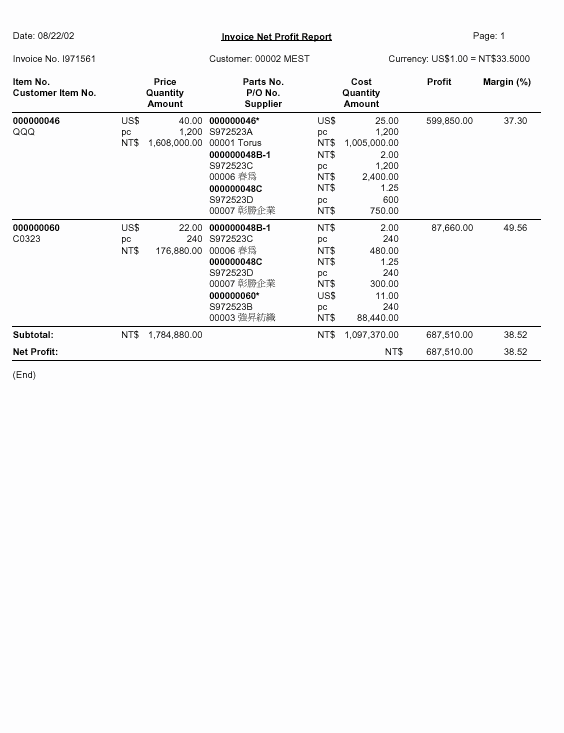
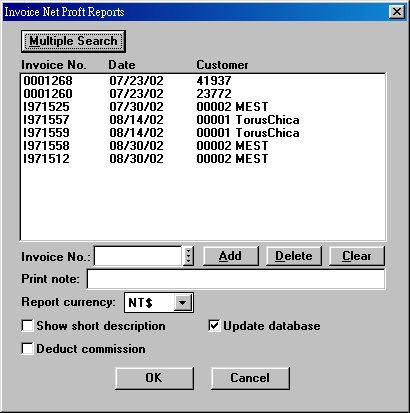
| Invoice No. | 發票號碼. |
| Report Currency | 選擇以何幣別顯示淨利報告. |
| Show short description | 選擇是否在淨利報告註明短品名. |
| Deduct commission | 顯示佣金, 並扣除之. |
可依發票號碼, 發票日期或客戶代號,
查詢淨利彙總表. 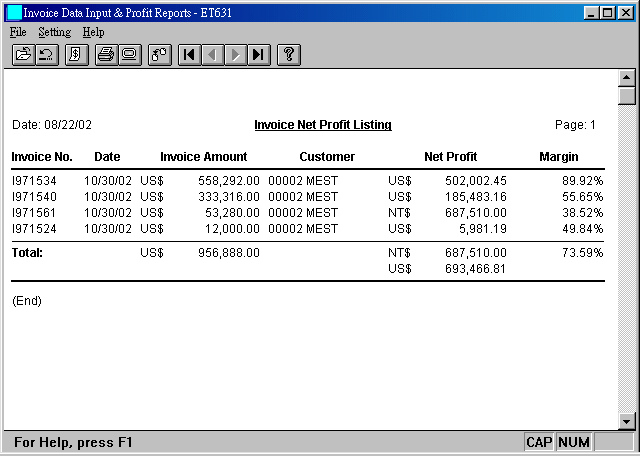
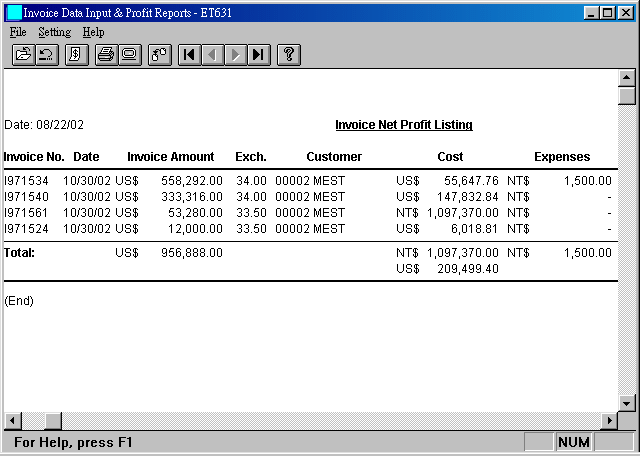
若選擇 Net Profit Listing (Landscape) 報表, 可多顯示成本及費用.
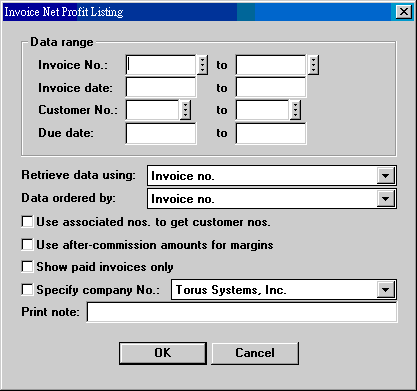
| Data range | 設定查詢範圍. |
| Retrieve data using | 擷取資料方式: invoice no., invoice date, customer no. + invoice date, due date. |
| Data ordered by | 報表資料排列方式: invoice no., invoice date, customer no. + invoice date. |
| Use associate nos. to get customer nos. | 將設定範圍內的客戶號碼視為 associate nos., 並展開其群組下所有客戶號碼. |
| Use after-commission amounts for margins | 計算利潤率時, 利潤需減去佣金. |
| Show paid invoices only | 只顯示已付款之發票. |
| Specify Company No. | 同一家公司, 不同名稱, 可指定查詢一家公司之淨利報表. |
| Print note | 輸入報表欲註明之事項, 列印時隨報表印出. |
30. Invoice Net Profit Listing on Excel
Microsoft Excel 樞紐分析表 (pivot table)
是個極為多變但操作容易的高階分析表. ET6.1
可以把出貨金額及淨利資料輸入樞紐分析表中,
讓你直接就能享用這個好工具. 按  再選擇 Invoice Net Profit List. (樞紐分析表的例子.)
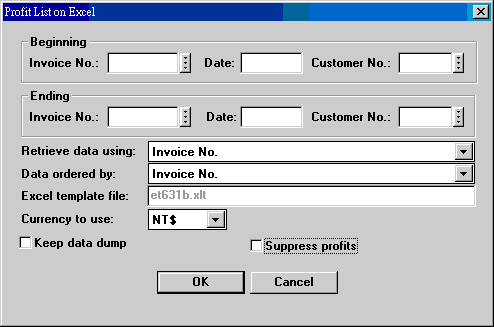
| Data range | |
| Retrieve data using | |
| Data ordered by | |
| Currency to use | 樞紐分析表中有出貨淨利及出貨金額兩類報表. 畫面中 Currency to Use 指的是淨利表之幣別. 出貨金額分析表的幣別由系統編碼 CURR-USE 決定; 標準幣別為 US$. |
| Keep data dump | 是否保留尚未轉換成 pivot table 的原始 Excel 資料. |
| Suppress profits | 若需要將淨利數值歸零, 勾選. 要求特定使用者必須 suppress profits, 可以使用權限 ET61-ET631-NAY-Open 設定. |
31. Item Profitability Report on Excel
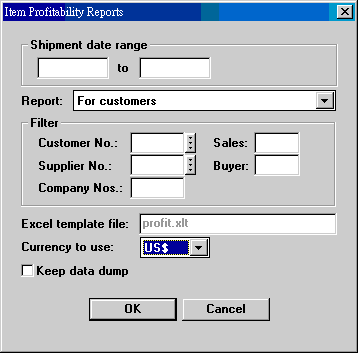
| Shipment date range | 一段出貨期間. 報表內容為此期間的出貨項目. |
| Report | 1. For customers 2. For suppliers 3. For sales 4. For buyers |
| Filters | |
| Currency to use | |
| Keep data dump |
| Date | Version | Downloads | Actions | Explanations |
|---|---|---|---|---|
| 2012-7-10 | SP3 Secured | et631zip.exe. | 下載安裝 | 做 invoice data input 時, 可設定系統編碼 (INV-GENRE 84th) 決定是否同時更新 shipment memo 的 total invoice amount 及 total item amount. |
| 2011-4-14 | SP3 Secured | et631zip.exe. | 下載安裝 | Invoice Profit Listing, Invoice Profit Listing II 增加 use associate nos. to get customer nos. 選項. |
| 2009-1-7 | SP3 Secured | et631zip.exe, etconvzp.exe. | 安裝 etconv.exe, 執行 27. Sctrans, 修正第 12 欄位的 INV_SEQNO. | Item Profitability Report on Excel 需要此一修正. |
| Code | Fields | Values | Explanations |
|---|---|---|---|
| INV-GENRE | 3 | A string | 69. Use INVSUP for suppliers (N/Y) 84. Update shipment memo (memomas) total amounts during invoice data input (N/Y) |
Last modified: July 2012