
ET122 Customer Data Retrieval
客戶資料查詢
內容
00. 總論本程式可列印或在螢幕上顯示客戶資料. 客戶之資料可依號碼, 名稱或建檔日期排列; 列印或顯示的內容為客戶基本資料, 產品或附註可選擇是否印出.
列印或顯示均針對一定範圍連續印出; 使用者可以指定特別文字過濾資料. 要個別指定列印客戶資料, 請使用 ET121 客戶檔資料輸入.
 |
列印鍵及顯示鍵. |
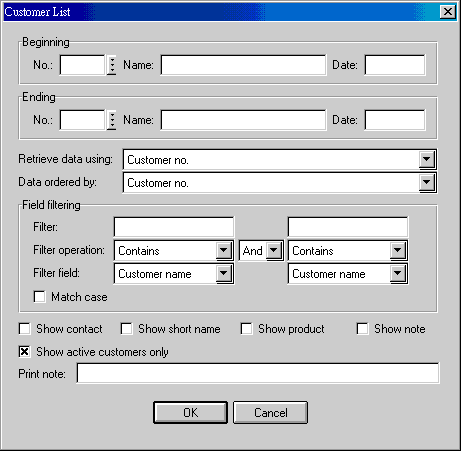
| Beginning...Ending | 範圍會限制顯示結果; 未設起始值, 由首筆印起, 未設截止值, 印到尾筆. 任何項目只要 beginning 和 ending 都設限, 就會過濾資料. 多重項目過濾有效. |
| Retrieve data using | 擷取資料方式. 設定資料範圍後, 適當選用擷取方式, 能加快擷取速度. 擷取方式如下: customer no., customer name, entry date, update date. |
| Data ordered by | 資料排列方式, 可以異於擷取方式. 排列方式如下: customer no., customer name, entry date, update date. |
| Field filtering | 所有欄位都可用來過濾資料. 電腦先處理範圍, 再處理過濾. 設定範圍能減去不必要的查詢, 縮短作業時間. 所以, 即使要使用 filter, 亦應儘量先設定範圍. |
| Show contact | |
| Show short name | |
| Show product | |
| Show note | |
| Show active customers only |
| Code | Field | Value | Explanation |
|---|---|---|---|
Last modified: January 2008