
Contents
00. Overview由網頁輸入的資料是存在網站上的. 那些資料會以 EDI 格式, 定時經 e-mail 送至公司. 將這些 EDI 檔案存在適當的資料夾後, 執行 Import EDI Files, 所有傳送過來的資料即會一次匯入 ET6.1 資料庫.
Export EDI Files 則是用來把 ET6.1 的資料匯出成 EDI 格式檔案 (!xxxxxx.edi 型態), 上傳至網站 (參考 ET6.1w 操作手冊 EDI Files -> Upload file 說明); 在一小時內, 這些資料即自動轉入網站資料庫, 立刻可在網頁上查詢.
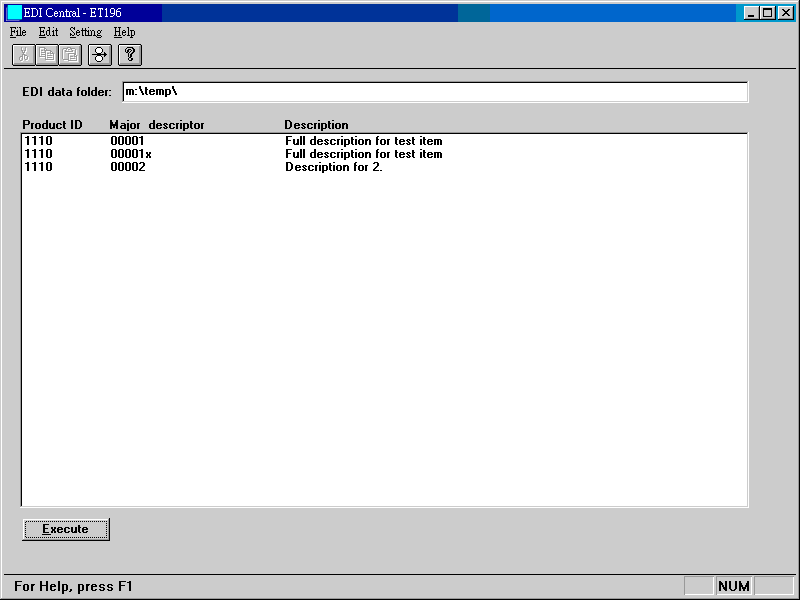
| EDI data folder | 由 e-mail 收到之 EDI 檔案存放之資料夾. 網站送來之 EDI 檔案之名稱都為 !xxxxxx.edi 之形式, 全可存在此資料夾. 一旦匯入, 檔案即刪除. 可用系統編碼 EDI-PATH 設定. |
| Product ID (File ID) | 程式內部自用之檔案代號. 參考 ET6.1w Notes. |
| Major descriptor | 每筆記錄最主要 key word, 如 item no. 或 S/C no. |
| Description | 比較詳細的資料摘要. |
| Execute (Start Importing EDI Data) | 開始將 EDI 檔案中之資料匯入 ET6.1 中. 每筆成功匯入之資料均會顯示在畫面 list box 中. |
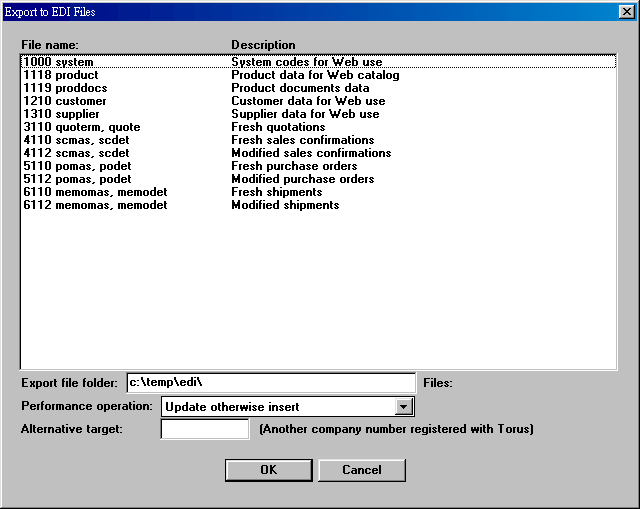
| File name...description | 目前可匯出之資料或檔案. |
| Export file folder | 存放匯出的 EDI 檔案的資料夾. |
| Performance operation | EDI 檔最終匯入 SQL
資料庫時選用的作業方式. 每種匯出都有內定的作業方式,
但可人為更改. Update otherwise insert: 若資料庫已有資料, 更改之. 否則新增. Insert only: 全部新增入資料庫. Clear all then insert: 先清除資料庫, 再新增. |
| Alternative target | If you have more than one Web sites, you can specify to export data to a site other than the current one. The value of a target should be a number assigned by Torus (i.e., a Torus' customer number for your company). |
22. Export EDI Files - Category Product
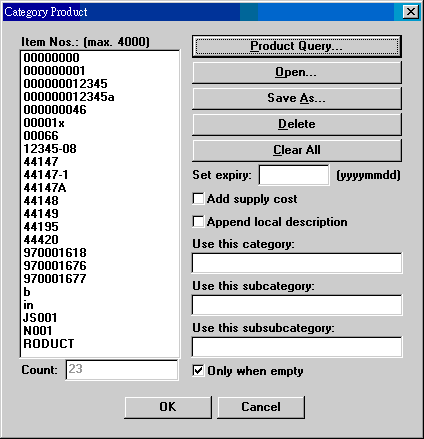
| Item Nos. | 由 e-mail 收到之 EDI 檔案存放之資料夾. 網站送來之 EDI 檔案之名稱都為 !xxxxxx.edi 之形式, 全可存在此資料夾. 一旦匯入, 檔案即刪除. 可用系統編碼 EDI-PATH 設定. |
| Count | 以上 list box 內 items 之數目. |
| Product query | 由 product 檔擷取 items.
產品資料必須含有 image file 資料才會被選取.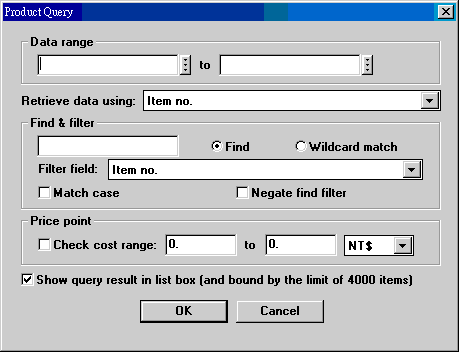 Retrieve data using: 可用 item no., category, entry date, other code, bar code 或 update date 設定範圍擷取資料. Price: 可以只匯出一定範圍成本之產品. Show query result...: list box 只能容納約 4000 個項目. 如果擷取項目超過此數字, 取消此選項, 讓資料直接存至記憶體. |
| Open | 開啟先前已存放 item nos. 之檔案. 基本上, 這是指以前用過之 item nos. 資料用 Save As 存成之檔案. 這些 item nos. 由於沒有變動, 可以重複使用. 但因內容會變, 必須重新匯出. 這種檔案可以有很多個, 也可以用 Notepad 一個 item no. 一行繕打. |
| Save As | 將 list box 內 item nos. 存檔, 供日後使用. |
| Set expiry | 設定這批匯出資料之有效到期日. 查詢 Web catalog 時, 到期日在 2050-1-1 之後的視為 our selections; 到期日在查詢當日之後的視為 new items; 其他視為 all items. All items 可設定成不包含 new items. |
| Add supply cost | 匯出產品成本, 做為線上報價依據. |
| Append local description | 產品品名增加中文部份. |
| Use this category | 把 list box 中項目原有之 category 強制改為這個類別. |
| Use this subcategory | 把 list box 中項目原有之 subcategory 強制改為這個類別. |
| Use this subsubcategory | 把 list box 中項目原有之 subsubcategory 強制改為這個類別. |
| Only when empty | 只強制更改原來類別空白之項目. 若取消選項, 則不管原來產品資料有無類別, 均強制替換掉. 無論是否使用強制類別, category 和 subcategory 都不能空白; 有一空白, 即不匯出. |
50. Export EDI Files - Fresh Purchase Orders
匯出新增訂貨單資料, 將一段時間的 P/O 資料全數匯出. 內定作業方式為 clear and then insert.
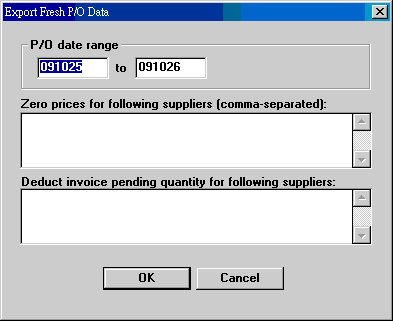
| P/O date range | 以 P/O date 為準的一段資料. |
| Zero prices... | 選擇讓指定廠商的單價為零. All 表示全部為零.; 廠商號碼之間用逗點隔開, 如 S0992, A9839.... 有系統編碼 EDI-ZEROPRICESUPS 可設定. |
| Deduct invoice... | 標準 pending quantity 是 delivery data input 後的結果, 並不考慮已入 shipment memo, 但未 input 的數量. 這裡選擇讓指定廠商的 pending quantity 改為原 pending quantity 再扣除上述中途數量的結果. 中途數量由 ET611 Suppliers 取得, 且須尚未做 delivery data input 者. 有系統編碼 EDI-DEDUCTINVQTYSUPS 可設定. |
51. Export EDI Files - Modified Purchase Orders
依第 50 節匯出訂貨單資料後, 續之而來的交貨或取消訂單作業均會影響訂貨單的狀態. Modified Purchase Orders 將內容已改變的訂貨單資料匯出.
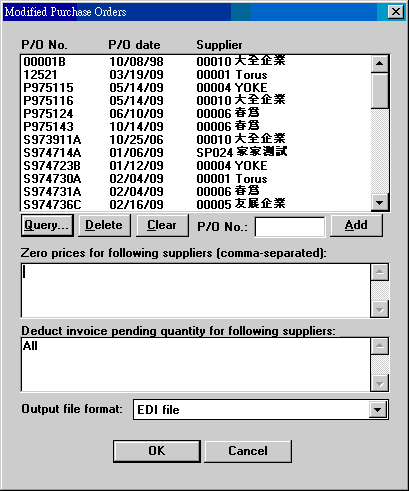
| Query | 找出一段時間內有過交貨或取消訂單之訂貨單.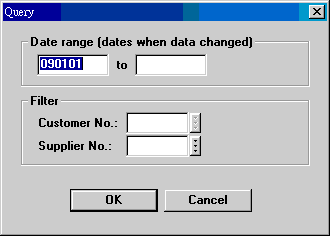 |
| Add | 逐筆輸入 P/O No. 用. |
| Zero prices... | 選擇讓指定廠商的單價為零. All 表示全部為零.; 廠商號碼之間用逗點隔開, 如 S0992, A9839.... |
| Deduct invoice... | 標準 pending quantity 是 delivery data input 後的結果, 並不考慮已入 shipment memo, 但未 input 的數量. 這裡選擇讓指定廠商的 pending quantity 改為原 pending quantity 再扣除上述中途數量的結果. 中途數量由 ET611 Suppliers 取得, 且須尚未做 delivery data input 者. 有系統編碼 EDI-DEDUCTINVQTYSUPS 可設定. |
| Output file format | 標準應為 EDI 檔案. 因 EDI 檔案內容不容易檢查, 另有 tab-delimited 格式匯出, 供必要時檢查用. |
| Date | Version | Downloads | Actions & Explanations |
|---|---|---|---|
| 2009-11-05 | SP3 Secured | et196czp.exe, etconvzp.exe. 非繁體中文視窗使用者改下載 et196zip.exe. | 安裝 etconv.exe 後, 執行 50. Invsup. 本次更新在增加 P/O 的 zero prices 及 deduct invoice quantities 兩項功能. |
| System Code | Field | Example | Field Explanation |
|---|---|---|---|
| EDI-PATH | 3 | C:\TEMP\ | 存放匯入用 EDI 檔案的資料夾. |
| EDI-PATH-EXPORT | 3 | C:\TEMP\EDI\ | 存放匯出之 EDI 檔案的資料夾. |
| EDI-DEDUCTINVQTYSUPS | 8 | Comma-separated text | Supplier numbers for which pending invoice quantities are to be deducted from P/O outstanding quantities. "All" 表全部. |
| EDI-ZEROPRICESUPS | 8 | Comma-separated text | Supplier numbers for which P/O prices are to be suppressed. The numbers separated by commas. "All" 表全部. |
| WEBEXP-INV | 3 | 20060101-20060630 | 前次 invoices 匯出作業時使用之日期範圍. |
| WEBEXP-PO | 3 | 20060101-20060630 | 前次 P/O 匯出作業時使用之日期範圍. |
| WEBEXP-SC | 3 | 20060101-20060630 | 前次 S/C 匯出作業時使用之日期範圍. |
Last modified: September 2013