ET512 P/O Viewing & Printing
訂貨單預覽列印
Contents
00. Overview本程式提供標準及多交期兩種格式訂貨單之預覽和列印; 兩種格式各有英文和中文之選項. 如有必要, 還可選擇使用第三種語言 (2nd local language). 文件使用到的標籤文字 (labels) 在系統編碼 PO-LABELS-x 設定 (x 由 0 到 2, 可設三種語言). 此外, 訂貨單也可以轉成 Excel 的格式, 以便更改或電子郵寄傳送.
由於列印之操作方式和 Excel 格式訂貨單相近, 請直接參考後者之說明. 選單列之說明請參考 ET511 訂貨單.
本程式讓你能跳躍式選擇訂貨單來列印. 假如你將給同一供應廠商的多張訂貨單選在一起, 可以用電腦一次傳真給對方. 第一家供應廠商的傳真號碼會存在剪貼盒中, 所以你可以用貼上的方式輸入傳真號碼.
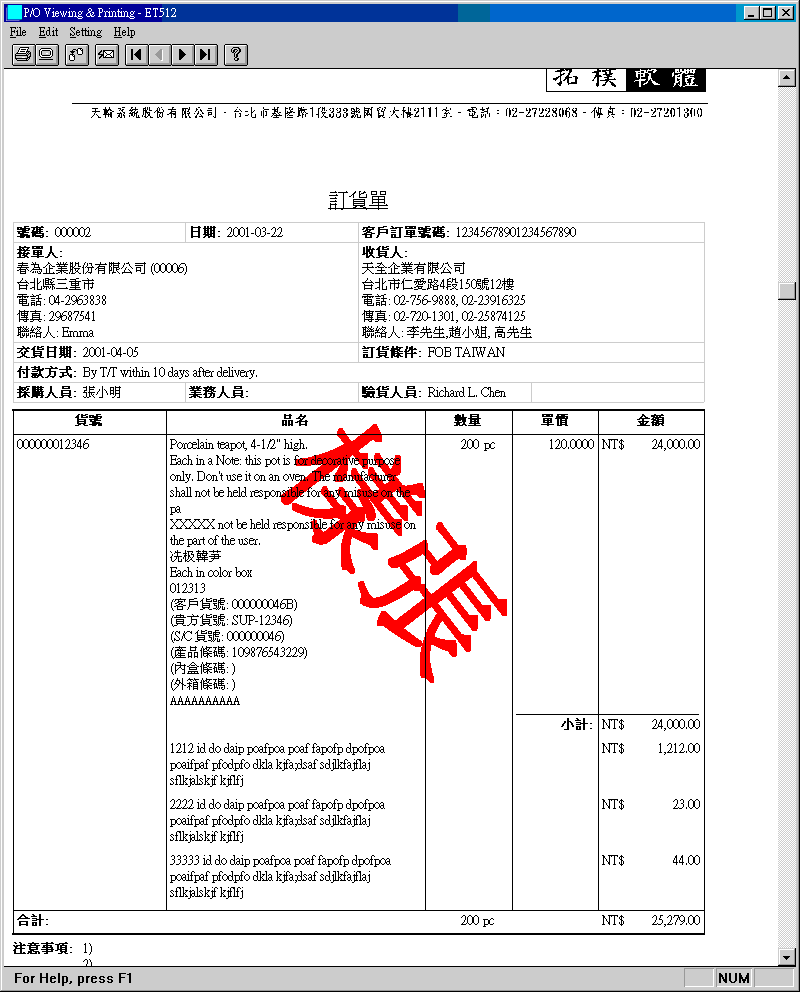
未授權之訂貨單印出時會有
"Specimen" 或 "樣張" 水紋.

  |
Standard Format...列印或顯示單一交期訂貨單.
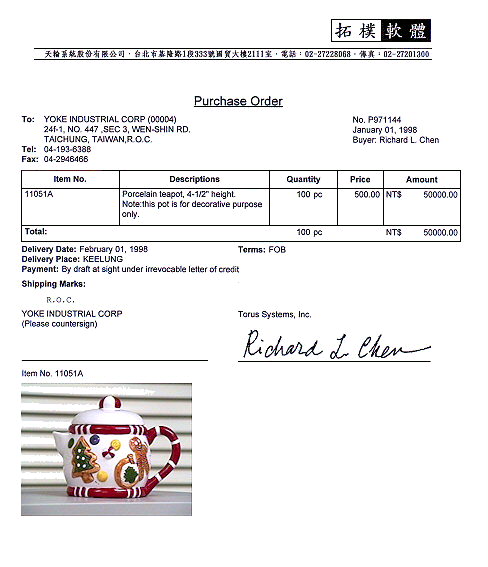 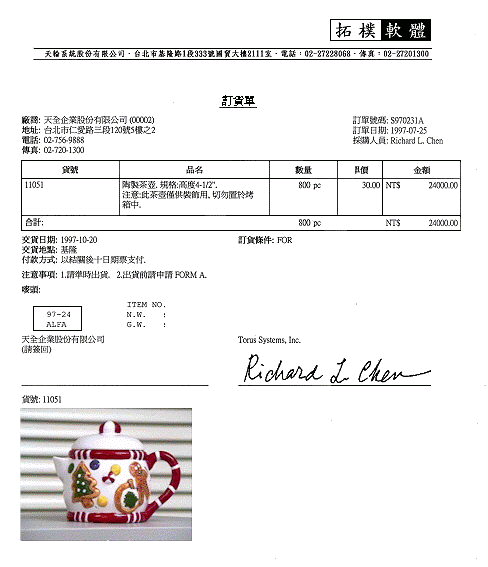 |
Multi-Delivery Format...
列印或顯示多交期英文格式訂貨單.  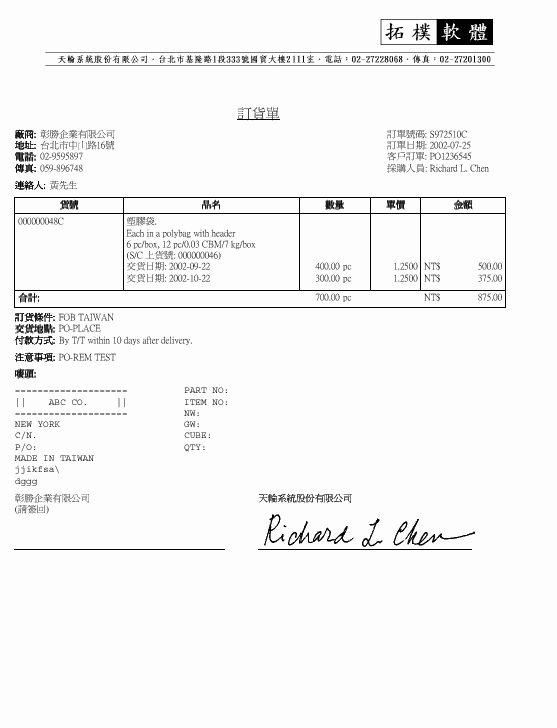 |
|
Photo Sheet... 列印或顯示訂貨單之產品圖片.
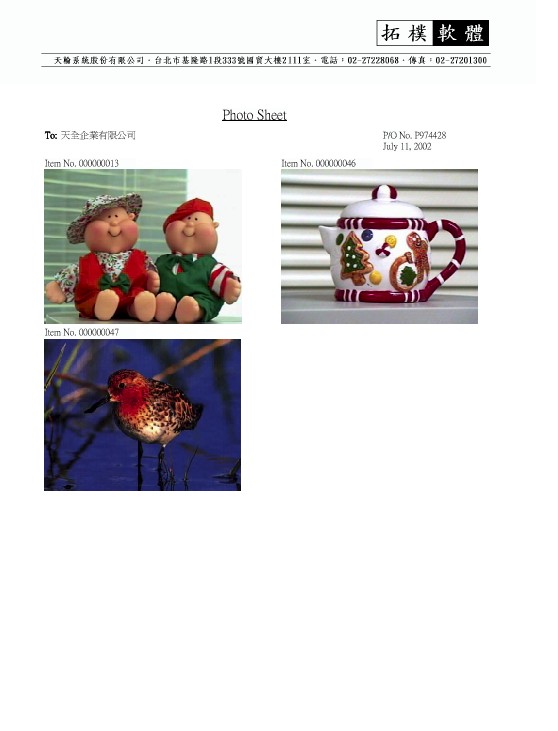 |
|
 |
產生 Excel 格式英文或中文訂貨單.
Document authorization 無效. (因不能凍結保護工作表.) |
| Setting | Description | Use Delivery Window | |
| Show Wide Description | |||
| S/C-Related | Show Customer No. | ||
| Show S/C Destination | |||
| Show S/C Packing | |||
| Number Formats | 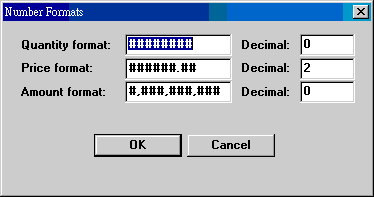 |
列印時, 數量, 單價和金額的數字格式, 原設於系統編碼 PO-QTY, PO-PRICE, PO-AMT, 可以在此臨時改變. 改變並未被記錄; 下次再印, 依舊回到系統編碼設定. |
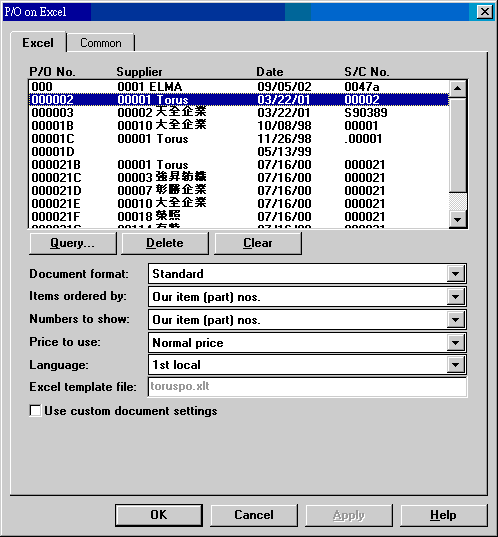
| P/O No....Supplier... | |
| Query | 選擇所要列印的訂貨單. 可以多次使用, 將訂貨單合併一起處理. 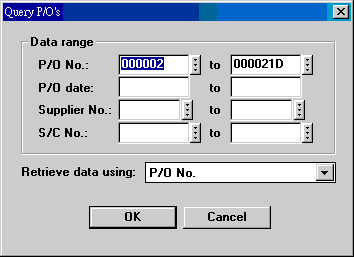 |
| Delete | 刪除一張列印的訂貨單. |
| Clear | 刪除所有列印的訂貨單. |
| Document format | Standard: 單交期. Multiple-delivery: 多交期. |
| Items ordered by | 每張訂貨單中 items 的排列順序: our item no., customer item no., model no., supplier item no., entry sequence. |
| Numbers to show | 貨號欄顯示的貨號: our item no., customer item no., supplier item no., supplier item no. 未被選定的貨號可以顯示在品名之下. |
| Price to use | Normal, 1st price 或 2nd price. |
| Language | 文件使用文字: English, 1st local (繁體中文), 2nd local (簡體中文). 1st local 及 2nd local 可使用其他不同語言作業系統的文字. 使用方法詳見系統編碼 PO-LABELS-0, PO-LABELS-1, PO-LABELS-2 說明. |
| Excel template file | 如有必要更改預設版面位置大小, 可用 Excel 開啟此檔案, 加以條改. |
| Use custom document settings | 列印設定 (見以下說明), 可以客戶設定. 如有設定, 可以勾選此項選擇. |
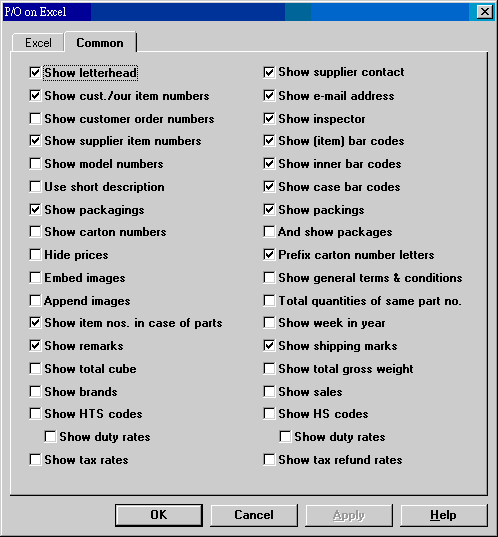
| Show letterhead | 顯示信頭. (使用印有信頭紙張者, 不必顯示信頭.) |
| Show supplier contact | 顯示廠商聯絡人. |
| Show customer/our item numbers | |
| Show (item) bar codes | 顯示商品條碼號碼. (號碼, 非條碼.) |
| Show supplier item numbers | |
| Show inner bar codes | |
| Show supplier item numbers | |
| Show case bar codes | |
| Show model numbers | |
| Show e-mail address | |
| Show packagings | 顯示產品包裝. |
| Show packings | 顯示裝箱資料. |
| Show carton numbers. And pakcages | 顯示箱號, 以及件數. |
| Use short description | 使用短品名. |
| Prefix carton number letters | |
| Hide prices | |
| Show general terms & conditions | 在注意事項之後, 顯示一般條款 (設於系統編碼 PO-GTERMS). |
| Embed images | 在貨號下顯示產品影像. |
| Show inspector | |
| Append images | 在文件最後顯示產品影像, 為左右二欄大小. |
| Total quantities of same part no. | |
| Show item nos. in case of parts | |
| Show week in year | 交貨期在日期之外, 附加顯示年度周數. |
Excel 和 Common 這兩個標籤頁先選後選不影響結果. 如果你選用三張訂貨單, Excel 會產生三本活頁簿, 每本活頁簿有一工作表, 內容為一張訂貨單. 活頁簿的名稱為訂貨單號碼加 .xls; 例如訂貨單號碼為 P980708, 則活頁簿名稱為 P980708.xls. 在 Excel menu 視窗功能表 (Windows) 最下方, 有所有活頁簿名稱. 要由一本活頁簿換至另一本活頁簿, 於該處選擇.
我們沒有把訂貨單工作表合併在一本活頁簿中, 因為如此一來便無法讓各個訂貨單有各自的檔案, 日後查詢或電子郵寄給人都有困難.
26. Delivery Schedule Change Notices
標籤指的是文件上固定使用的文字, 如訂貨單, 廠商, 地址等字眼. 這些標籤原來是寫在程式裡頭的, 現在移到系統編碼 PO-LABELS-x 中. x = 0 存英文標籤, x = 1 存繁體中文 (主要的本地語文), x = 2 存簡體中文 (第二本地語文, 需在相同 Windows 下作業). 標籤有一定的定義. 0 和 1 類有內定值, 所以改變設定只需針對對應標籤. 2 的內定值和 0 相同, 改變設定時全部都要.
| 英文 PO-LABELS-0 |
繁體中文 (local) PO-LABELS-1 |
簡體中文 (2nd local) PO-LABELS-2 |
|---|---|---|
| 0=continued 1=End 2=Date 3=Page 4=Delivery Date Change Notice 5=Purchase Order 6=Order To 7=Address 8=Phone 9=Fax 10=No. 11=Date 12=S/C No. 13=Buyer 14=Item No 15=Description 16=Quantity 17=Price 18=Amount 19=Subtotal 20=Total 21=Delivery Date 22=Purchase Terms 23=Delivery Place 24=Remarks 25=Shipping Marks 26=Please Countersign 27=Our Item No. 28=Your Item No. 29=Item Bar Code 30=Customer Order No. 31=S/C Item No. 32=Payment 33=Customer Order 34=Model No. 35=E-Mail 36=Outer Bar Code 37=Inspector 38=Inner Bar Code 39=Attention 40=Customer Item No. 41=Photo Sheet 42=C/No. 43=Sales 44=Delivery To 45=Pick List 46=Total Cube 47=Total G.W. 48=Brand 49=To 50=Our P/O No. 51=Original Delivery Date 52=Date of Change 53=New Delivery Date 54=Difference in Days 55=P/O No. 56=Page: %d 57=S/C Destination 58=S/C Packing 59=HTS Code 60=HTS Duty Rate 61=HS Code 62=HS Duty Rate 63=Tax Rate 64=Tax Refund Rate 65=Inclusive 66=Exclusive 67=Specimen |
0=接次頁 1=結束 2=日期 3=頁數 4=交貨日期更改通知 5=訂貨單 6=接單人 (廠商) 7=地址 8=電話 9=傳真 10=號碼 11=日期 12=S/C 號碼 13=採購人員 14=貨號 15=品名 16=數量 17=單價 18=金額 19=小計 20=合計 21=交貨日期 22=訂貨條件 23=交貨地點 24=注意事項 25=嘜頭 26=請簽回 27=我方貨號 28=貴方貨號 29=產品條碼 30=客戶訂單號碼 31=S/C 貨號 32=付款方式 33=客戶訂單 34=型號 35=電子郵件 36=外箱條碼 37=驗貨人員 38=內箱條碼 39=連絡人 40=客戶貨號 41=產品圖片 42=箱號 43=業務人員 44=收貨人 (貨交 ) 45=領料單 46=材數合計 47=毛重合計. 48=品牌 49=廠商 50=我方訂貨單號碼 51=原始交貨日期 52=更改日期 53=最新交貨日期 54=變動日數 55=訂貨單號碼 56=頁數: %d 57=S/C 目的地 58=S/C 包裝 59=HTS 稅則號碼 60=HTS 稅率 61=HS 稅則號碼 62=HS 稅率 63=稅率 64=退稅率 65=內含 66=外加 67=樣張 |
0=接次页 1=結束 2=日期 3=頁數 4=交货日期更改通知 5= 订货单 6=厂商 7=地址 8=电话 9=传真 10=订单号码 11=订单日期 12=S/C 号码 13=采购人员 14=货号 15=品名 16=数量 17=单价 18=金额 19=小计 20=合计 21=交货日期 22=订货条件 23=交货地点 24=注意事项 25=唛头 26=请签回 27=我方货号 28=贵方货号 29=条码 30=客户订单号码 31=S/C 上货号 32=付款方式 33=客户订单 34=型号 35=电子邮件 36=外箱条码 37=验货人员 38=内箱条码 39=连络人 40=客户货号 41=Photo Sheet 42=C/No. 43=業務人員 44=货交 45=領料单 46=材數合計 47=毛重合計. 48=品牌 49=厂商 50=我方订货單号码 51=原始交货日期 52=更改日期 53=最新交货日期 54=变动日数 55=订货单号码 56=Page: %d 57=S/C Destination 58=S/C Packing 59=HTS 稅則號碼 60=HTS 稅率 61=HS 稅則號碼 62=HS 稅率 63=稅率 64=退稅率 65=內含 66=外加 67=樣張 |
事實上, 1st local 和 2nd local 可以是日文, 韓文或其他語文. 標籤的長度最好不要變化大太, 因每個標籤列印的位置是固定的; 突然太長會有無法全部印出的可能.
| Date | Version | Downloads | Actions & Explanations |
|---|---|---|---|
| 2010-4-23 | SP3 Secured | et512zip.exe. | 增加 Delivery Date Change Notice. 系統編碼 DELDATE-CHANGE-0 為新設定, PO-LABELS-0 49= 以後亦是新設定. |
| Code | Fields | Values | Explanations |
|---|---|---|---|
| DELDATE-CHANGE-0 | 8 | Customizes text used in Delivery Date Change Notice. For English language documents. Default: The following are items whose delivery dates were changed during the period from %BEGIN_DATE% to %END_DATE%. | |
| DELDATE-CHANGE-1 | 8 | 設定交貨日期更改通知內文, 語文為 1st local. 範例: 以下為 %BEGIN_DATE% 至 %END_DATE% 之間交期有更改之貨號. | |
| ET512-GENRE-xxxxx | 3 | A string | xxxxx stands for supplier no. Refers to settings that control P/O contents and layout for this specific supplier, provided that "use custom document settings" has been activated. |
| ET512-LAYOUT-MULTI | 3 | 6 numbers | Customizes column positions
for multi-delivery P/O's. Default: 0.0,1.8,4.5,5.5,6.1,7.2 Replaces PO-LAYOUT-MULTI. |
| ET512-LAYOUT-NOTICE | 3 | ||
| ET512-LAYOUT-PO | 3 | 6 numbers | Customizes column positions
for standard P/O's. Default: 0.0,1.8,4.5,5.5,6.1,7.2 Replaces PO-LAYOUT. |
| PO-FONT | 3 5 |
Times New
Roman 0 |
English font family name and character set for document. |
| PO-FONT-2 | 3 5 |
新細明體 136 |
1st local font family name and character set for document. |
| PO-FONT-3 | 3 5 |
宋体 134 |
2nd local font family name and character set for document. |
| PO-FONT-EX | 3 5 |
Courier
New 0 |
English font family name and character set for wide description. |
| PO-FONT-EX2 | 3 5 |
細明體 136 |
1st local font family name and character set for wide description. |
| PO-FONT-EX3 | 3 5 |
宋体 134 |
2nd local font family name and character set for wide description. |
| PO-FONT-F | 3 5 |
Courier
New 0 |
English font family name and character set for shipping marks. |
| PO-FONT-F2 | 3 5 |
細明體 136 |
1st local font family name and character set for shipping marks. |
| PO-FONT-F3 | 3 5 |
宋体 134 |
2nd local font family name and character set for shipping marks. |
| PO-GENRE | 3 | Up to 100 characters | 6. Show customer order number (N/Y) 20. Language encoding (0-2) 41. Show customer no. after 6. (Y/N) 78. Use custom document settings (N/Y) 79. Show S/C destination (N/Y) 80. Show S/C packing (N/Y) 94. Show cancellations (N/Y) 96. Use compact format (N/Y) 97. Show IDC Dept (N/Y) 98. Use special printer (N/Y) 100. Excel template version 2003 (Y/N) |
| PO-LABELS-0 | 8 | 0=continued ... |
Customized labels (captions) used in document. Specify only changed labels. (See table above) |
| PO-LABELS-1 | 繁體中文. | ||
| PO-LABELS-2 | 簡體中文. | ||
| SYSTEM-GENRE | 3 | 53. Trim blank description supplements (N/Y) |
Last modified: January 2014