Contents
00. Overview
20. Batch Invoice Data Input (Custom-Made)
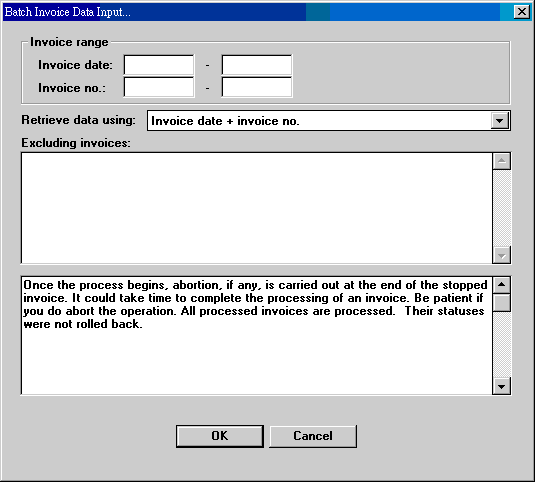
In ET6.1, we use invoice data input to cancel out outstanding orders in S/C's and invoice delivery data input to cancel out outstanding orders in P/O's. The jobs are performed in ET631 and ET541, respectively. The users select an invoice at a time to do the job. The new function here allows users to do the data input job on many invoices at a time. This process affects many parts of ET6.1 and can probably affect the overall responsiveness of the system. Do it on slack time. And back up before you go ahead.
| Invoice range | Invoices can be specified by invoice date range or invoice number range. |
| Retrieve data using | Match your selection above with a corresponding selection. No matter what you select, the result is the same, but the processing time can be hugely different. |
| Excluding invoices | If you have invoices that you still want to keep intact in the above invoice range, enter those invoice numbers here. Separate the numbers with spaces, commas, tabs or even carriage returns. |
| Function note | Read to know more. |

| Date | Version | Downloads | Actions & Explanations |
|---|---|---|---|
| System Code | Field | Value | Explanations |
|---|---|---|---|
Last modified: August 2011