System Logs
系統記錄
Contents
000. Overview
100. Start Page
999. System Codes
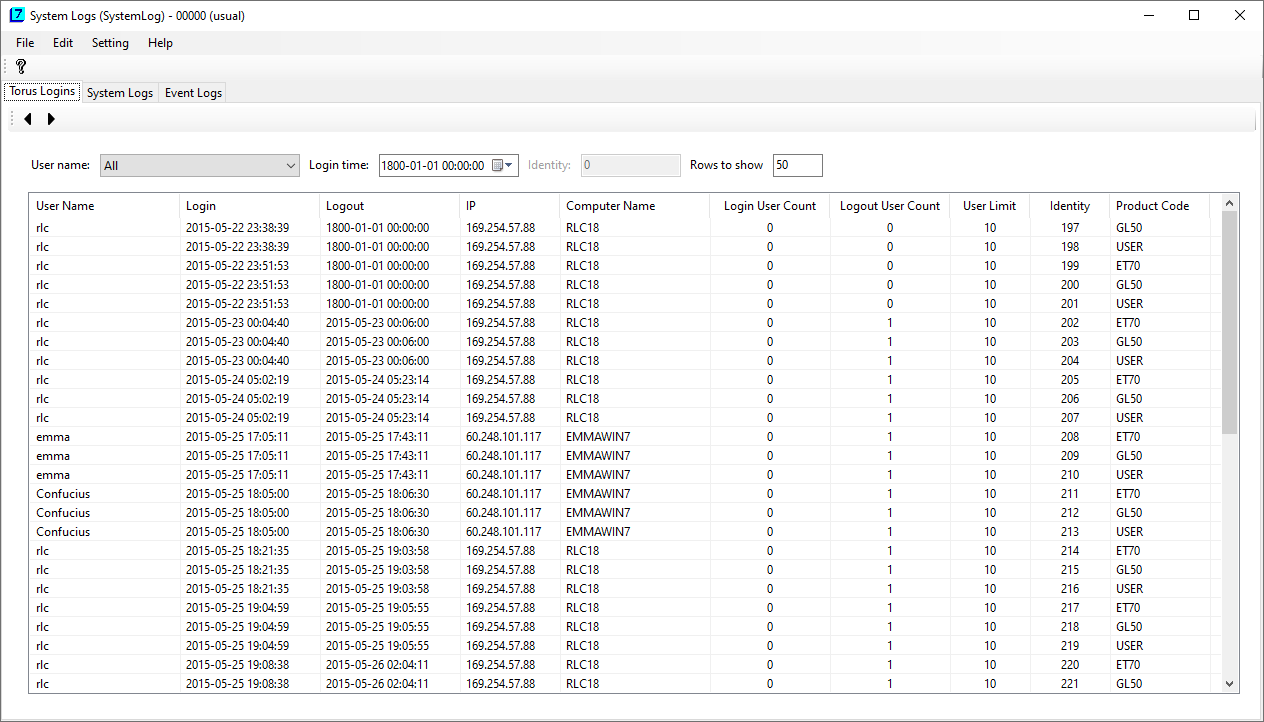
Every operational movements in Torus 7.0 are recorded. Such logs are created when a user logs into ET7.0 or GL5.0, when she lauches a program and when she inserts, updates or deletes data in a program. Recorded information contains the user, login time, logout time, machine IP, machine name, program name, data tables and operations. That is, you can always look up the whole operations of the system.
Torus Logins:
| User name | You can check for all users, or specify a single user. |
| Login time | The beginning time to check. |
| Identity | |
| Rows to show | Usually 50 items a time. But you can set any number you like. After you have entered data in these fields, click the previous or next button on the toolbar, to get the desired data. |
System Logs:

| User name | |
| Login time | The beginning login time to check. |
| Program | Blank for all programs. You can also specify a single program name for a specific look-up. |
| Identity | |
| Rows to show |
Event Logs:

| User name | |
| Time | The beginning time to check. |
| Identity | |
| Rows to show | |
| Filers - Event | All for all kinds of operations. Or you can specify Insert, Update or Delete operations. |
| Filter - Program | Blank for all programs. You can also specify a single program to look up. |
| Filter - Data |
Data refers to data tables. Blank means all tables. Or you can specify a
single data table to narrow your search. |

The following are codes that are relevant in this program. For full definitions, refer to System Codes.
| Code | Note (Examplary Tag Values) | Explanations |
|---|---|---|
Last modified: October 2021