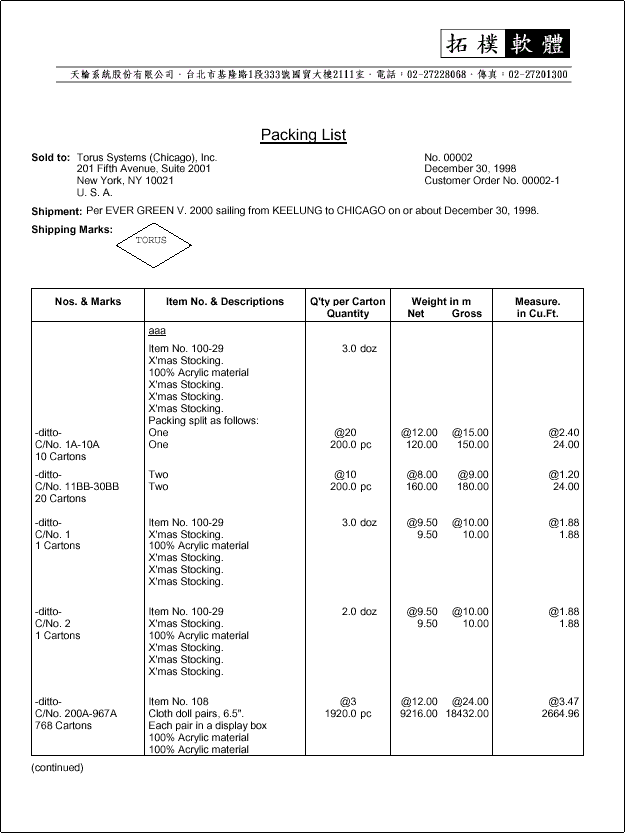
ET613 Shipping Documents
出貨文件預覽列印
Contents
00. Overview預覽及列印商業發票, 裝箱單, 產地證明, 客戶出貨通知, 押匯匯票等文件, 並可轉成 Excel 格式文件.
裝箱單最右欄材數之顯示方式, 改由在各 invoice 輸入時決定, 不在此統一決定.
 |
文件列印: Commercial Invoice. 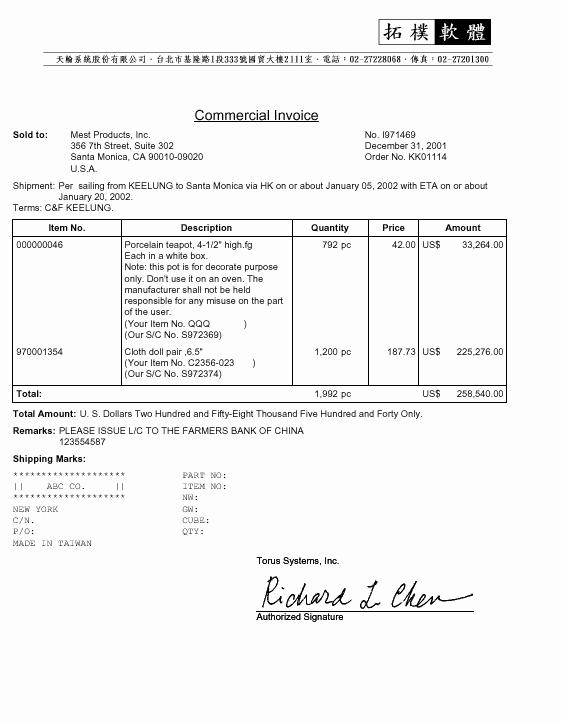 Packing List. 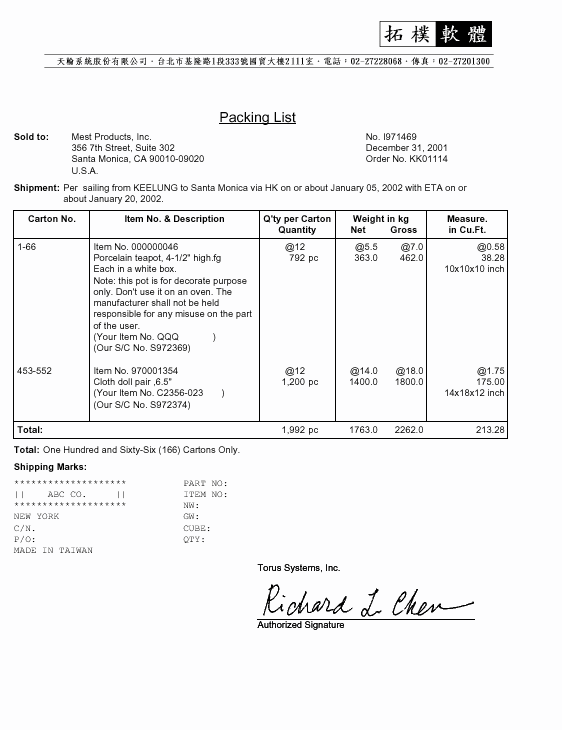 Palletized Packing List. 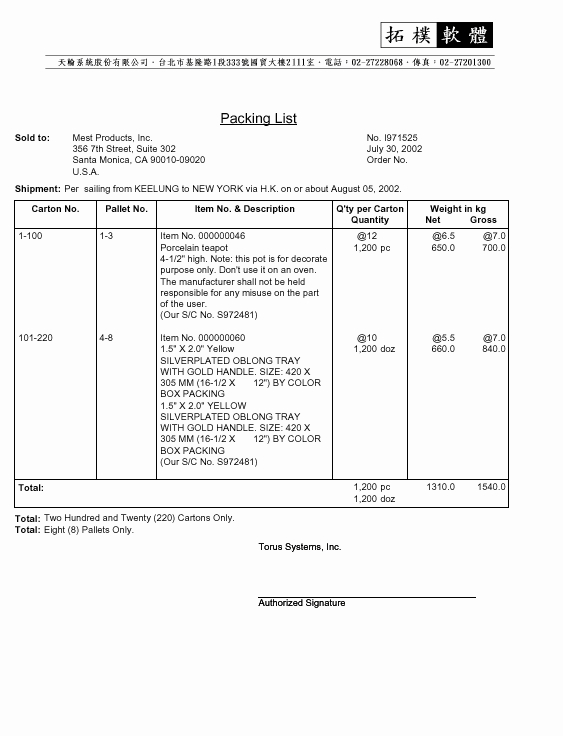 Certificates. 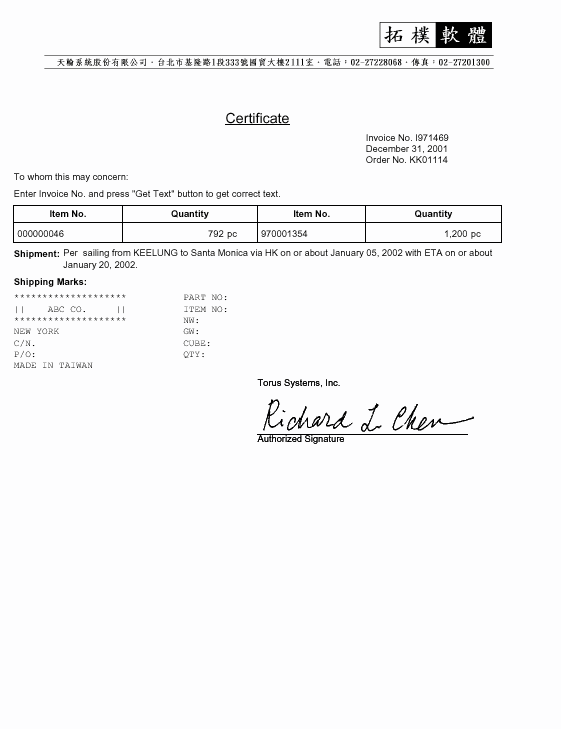 Shipping Advice. 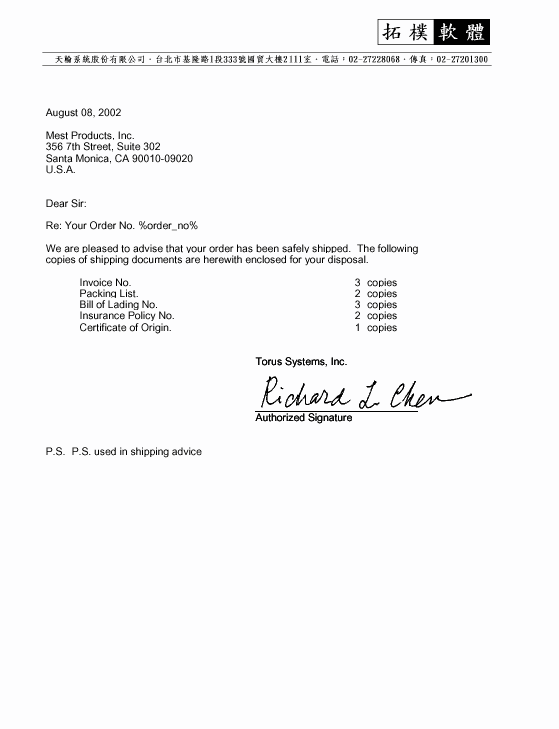 Breakdown Lists.  Draft... 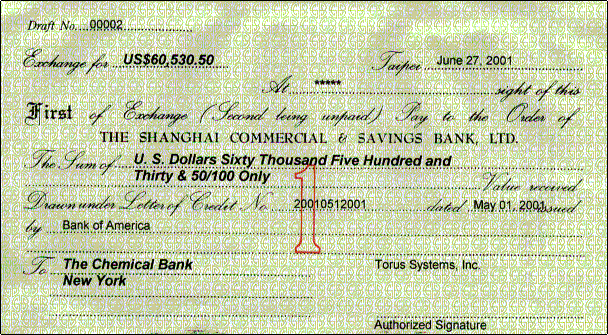 |
 |
預覽文件. |
 |
產生 Microsoft Excel 格式之商業發票, 海關發票, 裝箱單.  |
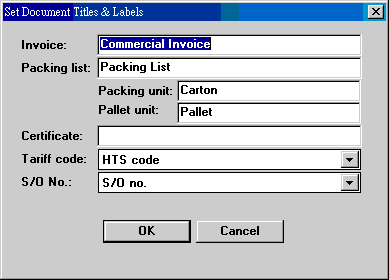
| Document Titles |
 |
| Signatures |
Don't Show Signature Block: 不要顯示簽名欄 Show Signature: 顯示簽名式 (須先設好簽名檔). Show Authorized Signature: 顯示簽名者姓名, 或就用 Authorized Signature. |
| Description |
Show Normal Description Show 2nd Description Show 3rd Description Show None: 略掉品名. Use Compact Format: 同品名 items 只顯示短品名, 長品名共用. Show Wide Description: Show Description Extension: |
| Bold Shipping Marks | 以粗体列印嘜頭 (便於傳真). |
| Show Customer Order Nos. | 在文件首頁右上方顯示單一的客戶訂單號碼 |
| Append Customer No. | 在客戶名稱之後追印客戶號碼. |
| Overwrite Ending Field | 查詢資料輸入範圍時, 強制讓截止值和起始值相同. |
| Use Customer Item Tariff Codes | 顯示 HTS 或 HS codes 時, 改使用 customer item no. 的相關資料. |
| Hide -ditto- | 使用 ditto 嘜頭格式時, 不顯示 -ditto - 字眼. |
| Draft Printing Parameters | 設定跟單匯票列印參數. |
Excel 格式有四種文件 (Invoice, Packing List, Certificate, Advice), 分成以下畫面說明. Common 為所有文件共有的選項; 個別文件另有個別的選項.
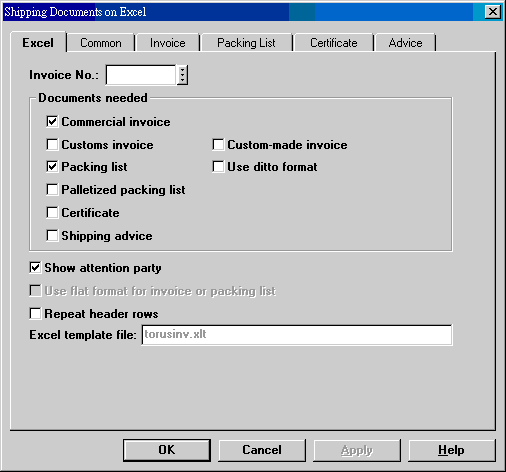 |
填入或查詢出 Invoice No., 選擇需要之文件.
所有文件會放在同一工作薄中, 每份文件放在一個工作表. Customs
Invoice 為台灣海關報關時要求的發票格式.
Excel template file 為文件範本. 範本為文件的基本格式, 如字体或大小等設定. 這個範本由我們提供, 使用者可以修改範本, 但不能更改檔案名稱. 產生之 Excel 檔案若無重複, 以 Invoice No. 為名. |
||||||||||||||
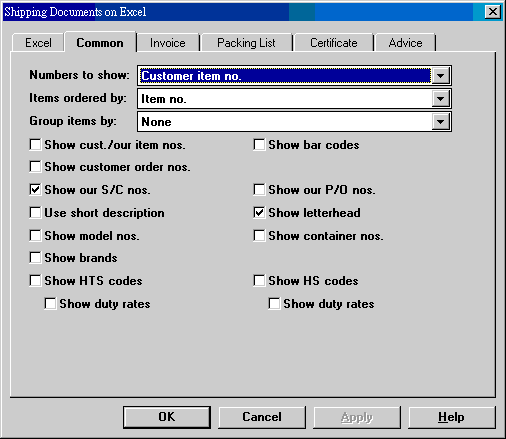 |
所有文件共同的選項在此畫面.
|
||||||||||||||
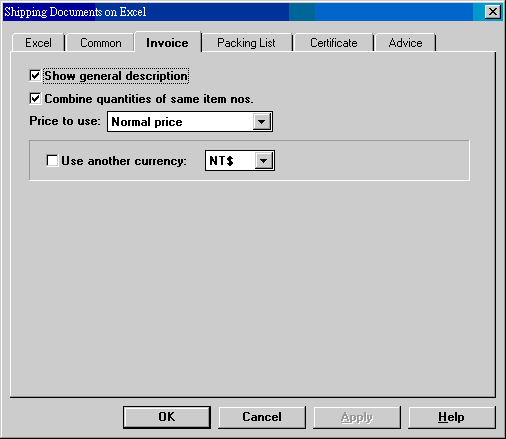 |
Invoice 之選項在此畫面.
|
||||||||||||||
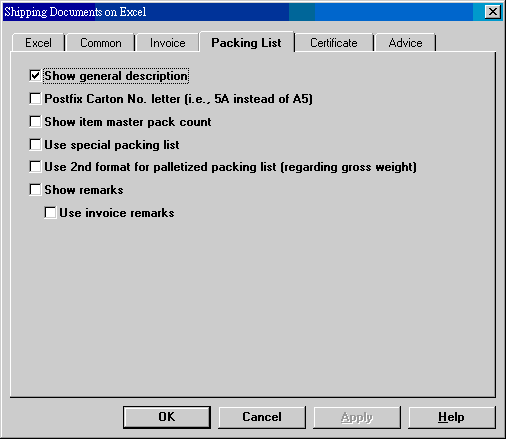 |
關於 Packing List 之設定在此畫面選擇.
|
||||||||||||||
 |
|
||||||||||||||
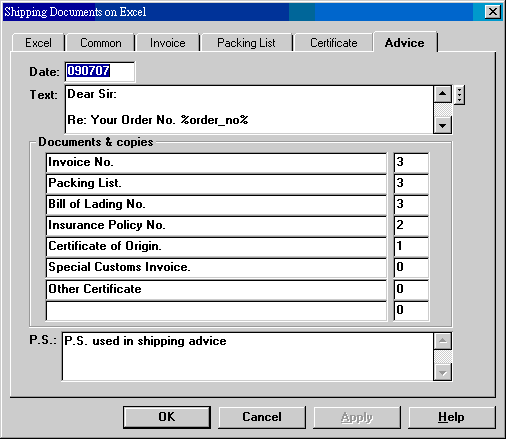 |
Shipping advice 之內容在此畫面調整.
|
這個程式須用到 Microsoft Excel 97; 你必須在每台工作站上安裝 Excel 或 Microsoft Office 97. 另外, 你還得在系統編碼中新增 EXCEL-PATH 記錄, Long Name 的標準值為 f:\torus\et60\excel. 詳見系統編碼表.
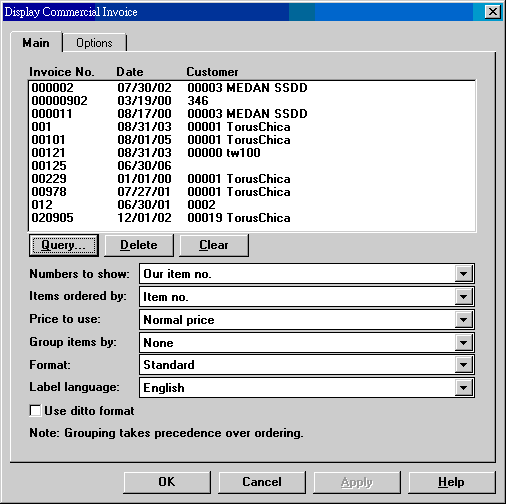
| Query | 擷取一段 invoices. 可重複擷取. |
| Delete | 刪除一張 invoice. |
| Clear | 清除所有 invoices. |
| Numbers to show | 在 Item No. 欄位顯示我方貨號, 客戶貨號或型號. |
| Items ordered by | 貨號排列順序, 不做分類.
若選用了以下 group items by 功能, 這裡的選擇失效.
選項如下: Item no. Customer item no. Model no. Entry sequence + item no. Customer order no. + customer item no. Customer order no. + supplier no. Carton no. Pallet no. + carton no. Container no. + item no. Category + item no. S/C no. + supplier no. + item no. S/C no. + item no. S/C no. + carton no. Supplier no. + item no. |
| Price to show | Normal price 2nd price 3rd price |
| Group items by | 分類再排列. 本選項優先於上面
items ordered by 選項. None Customer order no. (+ customer item no.) Customer order no. (+ supplier no.) Container no. (+ item no.) Container no. (+ customer order no. + customer item no.) Category (+ item no.) Category (+ customer order no. + customer item no.) S/C no. (+ item no.) S/C no. (+ supplier no.) S/C no. (+ carton no.) Supplier no. (+ item no.) HTS code (+ item no.) HS code (+ item no.) |
| Format | Standard: 五欄表示, 含 item no.,
description, quantity, price, amount. Landscape: standard 之外, 右側增加每個 item 的 N.W., G.W. cube. |
| Label language | English, 1st local, 2nd local. 文件標題內定為英文. 使用者可以利用系統編碼 INV-LABELS-0, INV-LABELS-1, INV-LABELS-2 改變標題文字. 第一套仍為英文, 第二和第三套可以是任何語文. |
| Use ditto format | 在每一 Item 之前顯示該 item 的嘜頭. 參考 30. Ditto Format 說明. |
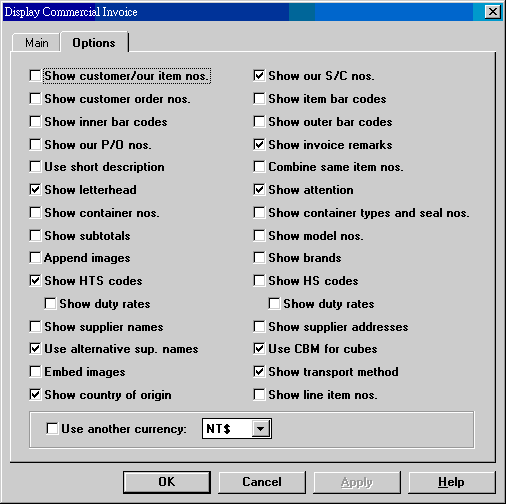
| Show customer/our item numbers | 如果 item no. to show 為我方貨號, 在品名下顯示客戶貨號. 反之, 如 item no. to show 為客戶貨號, 在品名下顯示我方貨號. |
| Show customer order numbers | 每一項目顯示客戶訂單號碼. |
| Show our S/C nos. | 顯示 item 的 S/C no. |
| Show item bar codes | 顯示 item 的條碼. |
| Show case bar codes | 顯示 item 的外箱條碼. |
| Show our P/O nos. | 顯示我方給廠商之訂貨單號碼. 如有兩張以上訂單, 選用代表出貨廠商訂貨單. |
| Show invoice remarks | 顯示 invoice remarks. |
| Use short description | 使用 item 短品名. |
| Combine same item nos. | 一個貨號可能因裝箱關係而分成兩次輸入. 在 invoice 時這樣的貨號應合併, 且內定合併. 但硬要拆開也可. 依箱號或墊板號碼排列時無效. |
| Show letterhead | 列印信頭. |
| Show attention | 客戶名稱地址之下顯示連絡人名稱. |
| Show container nos. | 顯示 item 的貨櫃號碼. |
| Show container types and seal nos. | 依 container no. 排列 group order 時, 在 container no. 之後顯示 container type 及 seal no. |
| Show subtotals | 以 groups 排列時, 顯示這些類別的數量及金額之小計. |
| Show model numbers | 顯示 item 的型號. |
| Append images | 在文件之後列印產品影像. |
| Show brands | 顯示 item 的品牌 -- 如果有的話. |
| Show HTS codes - show duty rates | 顯示 item 的 HTS 編號 (如果有的話), 以及稅率. |
| Show HS codes - show duty rates | 顯示 item 的 HS 編號 (如果有的話), 以及稅率. |
| Show supplier names | 顯示 item 的主供應廠商名稱. |
| Show supplier addresses | 顯示 item 主供應廠商地址. |
| Use alternative supplier names | 顯示供應廠商名稱時, 使用第二名稱. |
| Use CBM for cubes | Landscape 格式時, 材數是否用 CBM 表示 (標準為 cubic foot). 這個選擇會覆蓋 shipment memo 中 P/O dimensions 的選擇. |
| Embed images | 在貨號下顯示產品影像. |
| Show transport method | 在 invoice 首頁顯示運輸方式. |
| Show country of origin | 在 invoice 首頁顯示產地國. |
| Show line item nos. | 在各個 item 下顯示原始客戶訂單的 line item no. |
| Use another currency | 改用此處幣別重算並列印 invoices. |
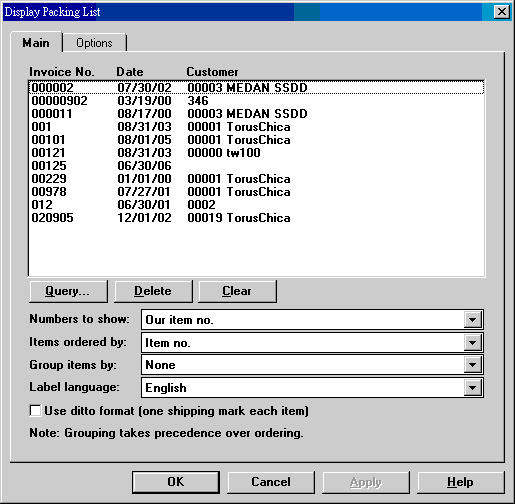
| Query | 查詢 invoice nos. 可以重複, 取得不同段落的發票. |
| Delete | 刪除點選之 invoice. |
| Clear | 清除所有查得 invoices. |
| Numbers to show | Our item no. Customer item no. Model no. |
| Items ordered by | 貨號排列順序, 不做分類.
若選用了以下 group items by 功能, 這裡的選擇失效.
選項如下: Item no. Customer item no. Model no. Entry sequence + item no. Customer order no. + customer item no. Customer order no. + supplier no. Carton no. Pallet no. + carton no. Container no. + item no. Category + item no. |
| Group items by | 分類再排列. 本選項優先於上面
items ordered by 選項. None Customer order no. (+ customer item no.) Customer order no. (+ supplier no.) Container no. (+ item no.) Category (+ item no.) S/C no. (+ item no.) S/C no. (+ supplier no.) S/C no. (+ carton no.) Supplier no. (+ item no.) |
| Use ditto format | 在每一 Item 之前顯示該 item 的嘜頭. 參考 30. Ditto Format 說明. |
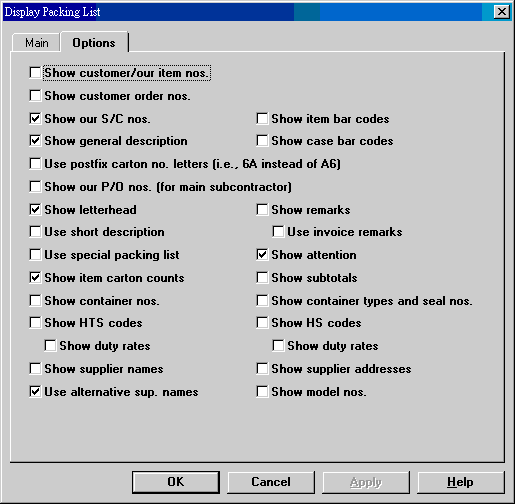
| Show customer/our item nos. | |
| Show customer order nos. | |
| Show our S/C nos. | |
| Show item bar codes | |
| Show general description | |
| Show case bar codes | |
| Use postfix carton no. letters | |
| Show our P/O no. | |
| Show letterhead | |
| Show remarks | 顯示 packing list 的 remarks. 未勾選時, 以下 invoice remarks 亦無效. |
| Use short description | |
| Use invoice remarks | 選擇列印 remarks 時, 改用 invoice remarks, 而不用 packing list remarks. |
| Use special packing list | 列印 special packing list. |
| Show attention | |
| Show item carton counts | |
| Show subtotals | |
| Show container nos. | |
| Show container types and seal nos. | |
| Show HTS codes - show duty rates | 顯示美國海關稅則號碼. 若勾選 show duty rates, 則稅率接後顯示. |
| Show HS codes - show duty rates | 顯示 HS 稅則號碼. 若勾選 show duty rates, 則稅率 (與上同一) 接後顯示. |
| Show supplier names | 顯示每一 item 的供應廠商名稱. |
| Show supplier addresses | 顯示上述廠商之地址. |
| Use alternative supplier names | 使用上述廠商第二名稱. |
| Show model numbers | |
輸入出貨資料時, 若包含 Pallet No., 可列印 Palletized Packing List.
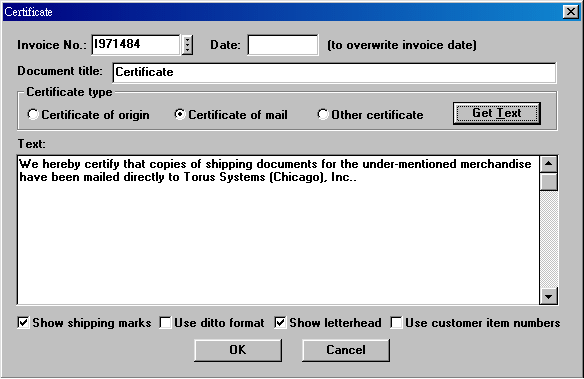
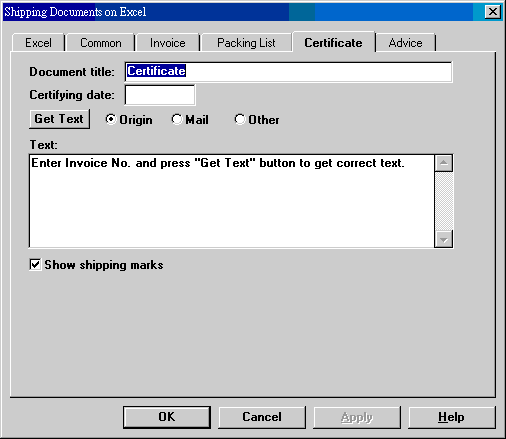
| Date | 一般同 invoice 日期, 但可以改為其他日期. |
| Document title | 文件抬頭, 標準為 Certificate, 但可以改成其他文字, 如 Weight Certificate 等. |
| Certificate type | 可將三種型態的文字預先用系統編碼 CER-ORIGIN, CER-MAIL, CER-OTHER 設定. 設定時可以保留客戶名稱等位置. 按 Get Text 時, 客戶名稱會自行取得套用. 詳細用法見系統編碼. |
| Text | 內容可依需要更改. |
給客戶的出貨通知, 內容及份數可在系統編碼 ADV-COPIES 預設. 通常做為出貨文件的 cover letter.
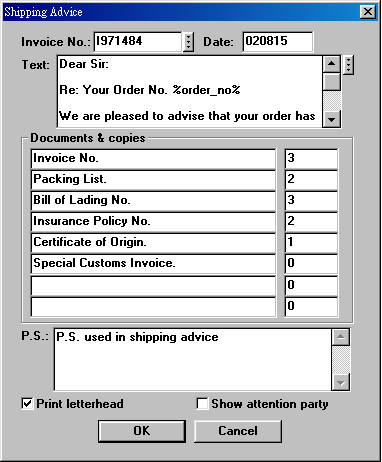
若在產品檔  輸入了產品的 C.C.C. Code, 美國進口稅則及 Cost/Weight Breakdown 明細, 可列印出貨項目的
cost breakdown list 和 weight breakdown list.
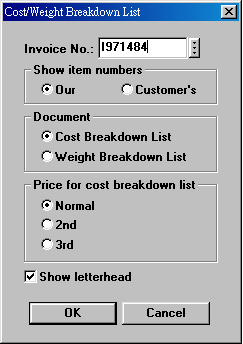
輸入了產品的 C.C.C. Code, 美國進口稅則及 Cost/Weight Breakdown 明細, 可列印出貨項目的
cost breakdown list 和 weight breakdown list.
 |
|
有的嘜頭包含隨 Item 變動的資料, 如 Item No, Order No. 等. Ditto 格式裝箱單讓你在嘜頭中利用特定的文字設定這些變動資料. 這些設定會依 Item 之資料而變動. 目前, 可用的特定文字有以下數個:
| 設定文字 | 代表資料 |
|---|---|
| <%item_no%> | 貨號, 可能為 Item No., Customer Item No., Model No. |
| <%order_no%> | 客戶訂單號碼 |
| <%carton_no%> | 箱號範圍, 如 1-100, 1A-100A, A1-A100 |
| <%pallet_no%> | 墊板範圍, 如 1-3, 2 |
| <%container_no%> | 貨櫃號碼. |
| <%packages%> | 件數, 箱數. |
| <%short_desc%> | 短品名. |
| <%outer%> | 外箱數量. |
| 附註: 1. 設定文字大小寫均可, 但字要完全相同. 2. 次序可以任意. |
|
舉個例子來說, 假設嘜頭設定和 Item 資料分別如下:
| 嘜頭 | Item 資料 | |
|---|---|---|
| <<0,0,20,10,T>> Torus Made in Taiwan Item No. <%item_no%> Order No. <%order_no%> C/No. <%carton_no%> Pallet No. <%pallet_no%> Container No. <%container_no%> <%packages%> cartons |
Item No. | ABS980725 |
| Order No. | WD1234 | |
| C/No. | 21AA-140AA | |
| Pallet No. | 3-5 | |
| Container No. | EG0909090909 | |
| Packages | 120 | |
則真正產生之嘜頭為:
-ditto-
Item No. ABS980725
Order No. WD1234
C/No. 21AA-140AA
Pallet No. 3-5
Container No. EG0909090909
120 cartons
這個嘜頭會被放在每個 Item 的左側, 文件的最左邊. -ditto- 可以不要 (利用
Setting | Hide -ditto-). 總嘜頭 (master mark, 全文件只有一個) 則變為:
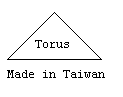
原嘜頭中含有設定文字的行會被刪去, 不會出現在總嘜頭中.
註: <<0,0,20,10,T>> 會畫出一個底 20 mm, 高 10 mm 的等邊三角形. 詳情見 ET6FAQ.
押匯銀行匯票格式各不相同, 所以在列印之前, 要先依照使用之匯票的格式設定一些參數. 任何格式的匯票都可設定; 一種格式一種設定.
按 Setting menu 下之 Draft Printing Parameters...:
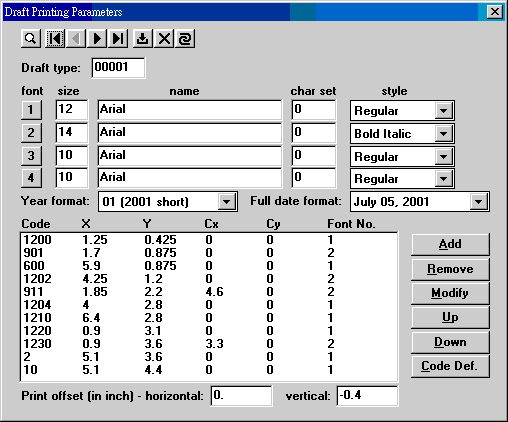
各種匯票均可設定. 不管是單頁或連續格式, 只要印表機能接受, 就可以設定. 每一種格式給予一個 draft type 編號. 一種格式可以使用四種字型 (按 1-4 按鈕或直接輸入); 字型包含大小, 字體和形態等變化, 可自由設定. 一張匯票由多個單元組成; 這些單元包括號碼, 開票日期, 信用狀號碼, 開狀行, 付款行, 金額等等. 每個單元都有一個相對應的 code designation. 一張匯票有多少個欄位, 就應設多少個單元. 單元 code 可以重複, 位置字型可以不同.
Up 和 Down 可以調整單元的上下位置, 不影響實際印出之結果. Print offset 用來調整全部單元 (整張匯票) 之位置. 不同印表機的左上角位置不同, 每次換用不同印表機時, 可用此二數字調整所有單元位置, 不必對個別單元調整.
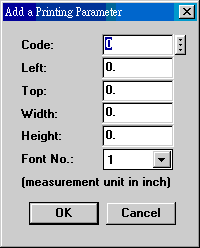
每個單元由六個數字組成: Code, X, Y, Cx, Cy, Font No. X, Y 為單元左上角之位置 (由匯票左上角算起). Cx, Cy 為一個單元最大寬度和高度. Font No. 可以從 1 到 4. 要增加單元時, 按 Add 鍵:
|
Left 即 X. Top 即 Y. Width 即 Cx. Height 即 Cy. 列印之資料若為單列, width 不必設. |
以下為可用的 codes 之定義和選用時之視窗:
| Code | Description | 說明 |
|---|---|---|
| 0 | x mark | 在指定位置印叉號 (x). |
| 1 | v mark | 在指定位置印勾號 (v). |
| 2 | Our company name | 我方公司名稱, 和 invoice 使用名稱相同. |
| 10 | Authorized signature | 授權簽字名稱, 由系統編碼 INV-SIGN, INV-SIGN1,... 決定. 和 invoice 相同. |
| 600 | Full issue date | 開票日期, 完整格式, 有四種選擇: (1) December 31, 2000; (2) 12/31/00; (3) 2000-12-31; (4) 12/31/2000. 匯票上若有二個以上完整日期單元, 只有選用一種格式. |
| 610 | Year of issue date | 開票日期的年度, 有三種選擇: (1) 00 (西元 2000 的短式); (2) 2000 (西元年度); (3) 89 (中華民國年度). |
| 612 | Month of issue date | 開票日期的月份. |
| 614 | Date of issue date | 開票日期的日數. |
| 900 | Amount | 阿拉伯數字金額, 如 134,567.00. |
| 901 | Amount with currency | 阿拉伯數字金額加幣別, 如 US$134,567.00. |
| 910 | Amount in words, English | 英文金額, 如 Four Thousand Five Hundred and Sixty-Seven Only. |
| 911 | Amount in words with currency, English | 英文金額加幣別, 如 U. S. Dollars Four Thousand Five Hundred and Sixty-Seven Only. |
| 912 | Amount in words, Chinese | 中文金額, 如肆仟伍佰陸拾柒元整. |
| 914 | Amount in Chinese digits, right-aligned | 中文金額, 如**肆伍陸柒, 靠右對齊. |
| 915 | Ditto, but evenly spaced | 同上, 但字與字距離由 Cx 決定, 適於套印. |
| 916 | Amount in Chinese digits w/decimals, right-aligned |
中文金額, 如**肆伍陸柒零零, 含角分, 靠右對齊. |
| 917 | Ditto, but evenly spaced | 同上, 但字與字距離由 Cx 決定, 適於套印. |
| 1200 | Draft No. | 匯票號碼. |
| 1202 | At sight | 即期或遠期兌現字眼. 預設值為 *****. |
| 1204 | L/C No. | 信用狀號碼. |
| 1210 | Full L/C date | 開狀日期, 完整格式. 格式和開票日期 600 相同. |
| 1212 | Year of L/C date | 開狀日期年度. |
| 1214 | Month of L/C date | 開狀日期月份. |
| 1216 | Date of L/C date | 開狀日期日數. |
| 1220 | Issuing bank | 開狀行. |
| 1230 | Paying bank | 付款行, 即 drawn on party. |
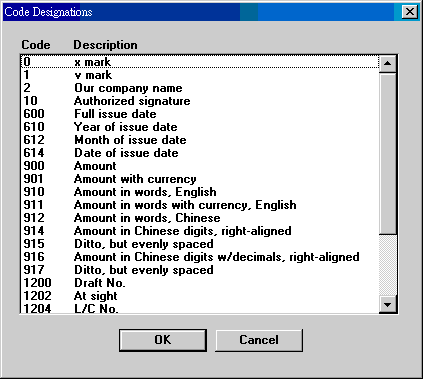
匯票列印一次一張, 可以預覽. 匯票資料由 invoice 和 L/C 檔案讀取. 列印之前, 應指定 draft type, 讓電腦知道使用何種格式列印.
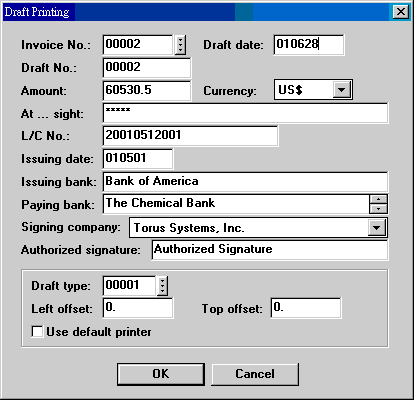
| Invoice No. | Invoice No. 跳離這個欄位時, invoice 資料會直接顯示. 若 invoice 上已有 L/C No. (理應如此), 信用狀資料會一併顯示. |
| Draft date | 開票日期, 和 invoice date 相同, 但可以更改. |
| Draft No. | 和 Invoice No. 相同, 但可以更改. |
| Amount | Invoice 總金額. 可以更改. |
| Currency | Invoice 總金額幣別, 可以更改. |
| At...sight | 兌現期限文字, 如 120 days after, 或 *****. |
| L/C No. | Shipment memo 上之 L/C No. |
| Issuing date | 開狀日期. |
| Issuing bank | 開狀行. |
| Paying bank | 付款行. 可使用多行. |
| Signing company | 若不用橡皮章時, 可以印出我方公司名稱. 列印參數單元若未設定此項, 無效. |
| Authorized signature | 簽字名稱. |
| Draft type | 匯票格式. |
| Left offset | 臨時可以更改左側空間. |
| Top offset | 臨時可以更改上方空間. |
| Use default printer | 若勾選, 則直接列印, 沒有選擇印表機機會. 可以節省時間. |
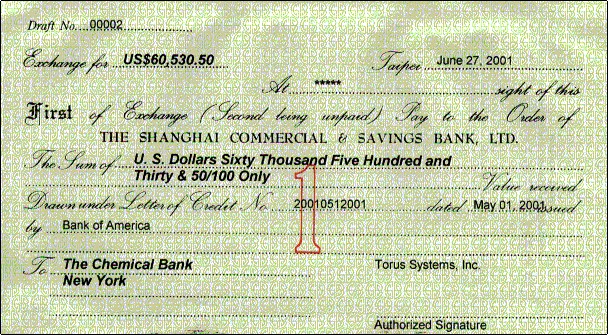
印出之匯票樣子如下:
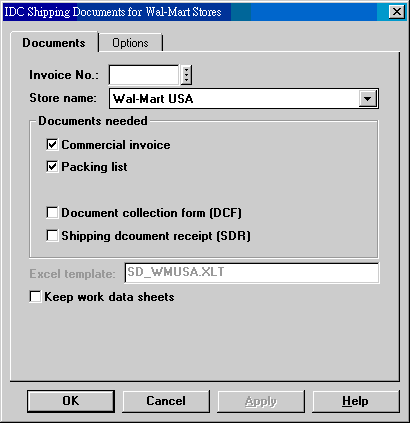
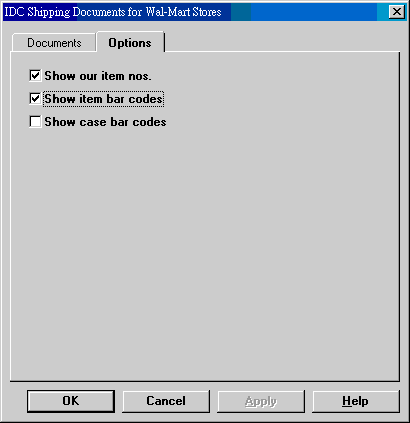
80. IDC Shipping Documents for Wal-Mart Stores
 |
|
||||||||||
 |
|
Some Shipment Memo fields (see ET611) are specifically used to map to fields in the Wal-Mart documents. The following table show such mappings. Suppliers for invoice items are fetched from data in Suppliers settings in ET611 start page.
| Wal-Mart Documents | ET6.1 Shipment Memo |
|---|---|
| On board date (invoice, packing list) | ETD (shipment memo master). |
| Product Description in L/C (invoice, packing list: in item title) | Items & Names in Letters of Credit (ET711). |
| Remarks payment (invoice) | Payment (shipment memo master) |
| Shipping Line (container manifest) | Carrier's name (derived from carrier no. in shipment memo master). |
| Sailing Date (container manifest) | ETD (shipment memo master). |
| Mid Code for Manufactures (invoice) | WM mid code (originally factory license no. in supplier data entry) |
Use tokens as place holders in shipping marks. Available tokens include the following:
| Token | Explanation | |
|---|---|---|
| <%cust_item_no%> | Customer item no. | |
| <%item_no%> | Our item no. | |
| <%item_name%> | Item name. If item names are available from L/Cs, they take precedence. | |
| <%order_no%> | Customer order no. | |
| <%po_type%> | Customer order type no. This value is stored in the "Other" or "PO type" field in the Edit Items dialog box of ET411 S/C. | |
| <%carton_no%> | Carton no. description, such as 100AB-499AB. | |
| <%pallet_no%> | Pallet no. description, such as 1000-1002 | |
| <%container_no%> | Container no. | |
| <%packages%> | Number of packages (cartons). | |
| <%short_desc%> | Item short description (first paragraph out of description). | |
| <%outer%> | Master pack number. | |
| <%outer_cube%> | Master case cube. | |
| <%outer_gw%> | Master case gross weight. | |
| Example | Shipping marks: | Results: |
| Walmart USA PO <%order_no%> PO TYPE <%order_type%> Asst# or Item# <%cust_item_no%> Supplier Stock# <%item_no%> <%item_name%> Shipping Case Qty: <%outer%> Made in China |
Walmart USA PO 3652367349 PO TYPE 0023 Asst# or Item# 1620060 Supplier Stock# 474005-78W 8-PC STANFORD SOLAR LIGHT SET Shipping Case Qty: 20 Made in China |
|
81. Container Manifest for Wal-Mart Stores
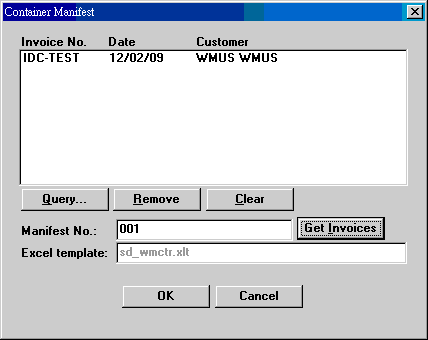
| Invoice No....Date...Customer | A container manifest can be composed of many invoices. This list box shows the invoices of a manifest. Use Query to get invoice data. |
| Manifest No. | A manifest no. represents all invoice nos. in a shipment. These invoices nos. are kept in Memorandum file, with IDC-CONTAINERMANIFEST-Manifest No. as the subject and invoice nos. in the text field. |
| Get Invoices | To retrieve invoices of a container manifest, so that a re-print is possible. |
Note: The P/O type in container manifest should be typed in the "Other" field in the Edit Items dialog box in S/C (ET411) when customer orders are taken.
| Date | Version | Downloads | Explanations |
|---|---|---|---|
| 2008-1-24 | SP3 Secured | et613zip.exe. | 新增 print log 功能, 列印 invoice 及 packing list 均做記錄. 首次要用此功能, 需先下載案裝 etmenuz.exe 及 print log. 前者為新的 menu, 後者為 log 的空白檔案, 且只應安裝一次. 列印報告置於 Utilities -> System Log 之下的 print log. |
| Code | Field | Value | Explanation |
|---|---|---|---|
| CER-TITLE | Replaced by INV-LABELS-x, tag 69. | ||
| ET613-LAYOUT-BDOWN | 3 | 3 numbers | Customizes column positions for Cost/Weight
Breakdown. (Replacing BREAKDOWN-LAYOUT.) Default: 0.0,3.6,7.2 |
| ET613-LAYOUT-INV | 3 | 6 numbers | Customizes column positions for invoice. (Replacing INV-LAYOUT.) Default: 0.0,1.8,4.1,5.3,6.0,7.3. |
| ET613-LAYOUT-INV2 | 3 | 9 numbers | Customizes column positions for landscape invoice. Default: 0.0,1.8,4.1,5.3,6.0,7.3,8.2,9.1,10.0. |
| ET613-LAYOUT-PA | 3 | 6 numbers | Customizes column positions for packing list. (Replacing PA-LAYOUT.) Default: 0.0,1.1,3.6,4.8,6.1,7.4 |
| ET613-LAYOUT-PAD | 3 | 6 numbers | Customizes ditto packing list. Replaces
PAD-LAYOUT. Default: 0.0,1.5,3.625,4.75,6.1,7.3 |
| ET613-LAYOUT-PAP | 3 | 6 numbers | Customizes palletized packing list. Replaces
PAP-LAYOUT. Default: 0.0,1.2,2.1,4.7,5.8,7.3 |
| IDC-DOCS | 3 | License key for IDC Shipping Documents for Wal-Mart Stores | |
| INV-AMT-LOCAL | 3 5 |
##,###,### 0 |
Amount format for encoding 1 and 2, 2 locals. |
| INV-CUSTOM01 | 3 | License key for Winwards Shipping Documents | |
| INV-GENRE | 3 | string | 67. Use customer item tariff codes (N/Y) 70. Show container types & seal nos. (N/Y). Effective only for group order by container nos. 79. Show transport method (N/Y) 80. Show country of origin (Y/N) 81. Show line item numbers (N/Y) 85. Show item total amount (N/Y) 86. Excel template version 2003 (Y/N) |
| INV-GENRE2 | 3 | 1. Numbers to show (0-2) 2. Items ordered by ([0-9][A-Z][a-z]) 3. Prices to show (0-2) 4. Group items by (0-8) 5. Show invoice, Excel (Y/N) 6. Show packing list, Excel (Y/N) 7. Show customs invoice, Excel (N/Y) 8. Show custom-made invoice, Excel (N/Y) 9. Show certificate, Excel (N/Y) 10. Show palletized packing list, Excel (N/Y) 11. Show advice, Excel (N/Y) 12. Repeat header rows - Excel (N/Y) 13. Items ordered by 1 of 3 ([0-9][A-Z][a-z]) (2016-12-30) 14. Items ordered by 2 of 3 ([0-9][A-Z][a-z]) 15. Items ordered by 3 of 3 ([0-9][A-Z][a-z]) |
|
| INV-LABELS-0 | 8 | 79 is a space | Customizes invoice and packing list labels --
English. Default: 0=continued 1=End 2=Date 3=Page 4=Packing List 5=Commercial Invoice 6=Order To 7=Address 8=Phone 9=Fax 10=No. 11=Date 12=S/C No. 13=Sales 14=Item No 15=Description 16=Quantity 17=Price 18=Amount 19=Subtotal 20=Total 21=Sold to 22=Ship to 23=Shipment 24=Payment 25=Insurance 26=Terms 27=N.W. 28=G.W. 29=Cube 30=Customer Order No. 31=Attention 32=Remarks 33=Shipping Marks 34=Please Countersign 35=Our Item No. 36=Your Item No. 37=Customer Item No. 38=Model No. 39=Bar Code 40=Inner Bar Code 41=Case Bar Code 42=Our P/O No. 43=E-Mail 44=C/No. 45=Total Cube 46=Total G.W. 47=Brand 48=Container No. 49=HTS Code 50=HS Code 51=Duty Rate 52=Manufacturer 53=VAT 54=Grand Total 55=Carton 56=Net 57=Gross 58=Unit 59=Carton No. 60=Measure. 61=Packing split as follows 62=Total Pallet 63=Pallet 64=Pallet No. 65=Other Weight & Cube 66=Nos. & Marks 67=Supplier 68= (a space) 69=Certificate 70=Your Order No. 71=Our S/C No. 72=Total Amount 73=Dimensions 74=Specimen 75=B/L No. 76=HAWB No. 77=MAWB No. 78=Transportation 79= 80=Tracking No. 81=Country of origin 82=Line Item No. 83=Items Total Amount 84=Pallet Bar Code 85=Total Packages 86=Ditto 87=Notify Party 88=Supplier Item No. |
| INV-LABELS-1 | 8 | 79 is a colon (;) | Customizes invoice and packing list labels --
first local (any) language. Example: 0=接次頁 1=結束 2=日期 3=頁數 4=裝箱單 5=商業發票 6=訂單號碼 7=地址 8=電話 9=傳真 10=號碼 11=採購 12=S/C 號碼 13=業務 14=貨號 15=品名 16=數量 17=單價 18=金額 19=小計 20=合計 21=買方 22=貨送 23=運送方式 24=付款方式 25=保險條款 26=出貨條款 27=淨重 28=毛量 29=材數 30=客戶訂單號碼 31=連絡人 32=注意事項 33=嘜頭 34=請簽回 35=我方貨號 36=貴方貨號 37=客戶貨號 38=型號 39=條碼 40=內包裝條碼 41=外箱條碼 42=我方訂單號碼 43=E-Mail 44=C/No. 45=Total Cube 46=Total G.W. 47=品牌 48=號櫃號碼 49=HTS Code 50=HS Code 51=Duty Rate 52=製造廠商 53=加值稅 54=總計 55=箱 56=淨重 57=毛重 58=單位 59=箱號 60=外箱尺寸 61=包裝拆箱如下 62=墊板合計 63=墊板 64=墊板號碼 65=其他重量和材數 66=箱號 & 嘜頭 67=供應廠商 68= (no space) 69=證明書 70=貴方訂單號碼 71=我方確認書號碼 72=總金額 73=尺寸 74=樣張 75=B/L No. 76=HAWB No. 77=MAWB No. 78=Transportation 79=; 80=Tracking No. 81=Country of origin 82=Line Item No. 83=Items Total Amount 84=Pallet Bar Code 85=Total Packages 86=Ditto 87=Notify Party 88=Supplier Item No. |
| INV-LABELS-2 | 8 | Customizes invoice and packing list labels -- second local language. | |
| SYSTEM-GENRE | 3 | A string | 13. Show currency in price column. |
| VISTEON-EDI | 3 | License key for the said custom function. | |
| WINCRAFT-MANIFEST | 8 | PortArrivalDays=21 ProcessDays=7 ShipToArrivalDays0=28 ShipToArrivalDays1=28 Dummy=0 |
Last modified: March 2010